Pipedrive Automatic Assignment: What It Can't Do and When That's Okay
Pipedrive’s automatic assignment does exactly what most small sales teams need: it routes new deals to the next rep in line. For many teams, that’s the whole story, and it’s a good one.
But you’re here because you suspect it’s not the whole story for your team. Maybe you’re already using automatic assignment and hitting walls. Maybe you’re evaluating it and want to know what the marketing page doesn’t say. Either way, you deserve a straight answer.
Pipedrive launched automatic assignment in April 2023, and it works well for a lot of teams. Their own sales team uses it. But Pipedrive’s own FAQ quietly acknowledges several things the feature can’t do. This article unpacks those limitations, explains when they actually matter, and tells you when they don’t.
A note about bias: We make RouterJet, a lead routing tool for Pipedrive. We’re a competitor. We’ll be upfront about that throughout this article, and we’ll tell you when you don’t need us.
What Pipedrive’s automatic assignment actually does
Before we talk about limitations, let’s give credit where it’s earned.
Pipedrive’s automatic assignment handles round-robin assignment for new deals, new leads, and deals that change stage or pipeline. You can create up to 50 rules per entity type, with conditions based on default and custom fields. It supports four assignee types: a specific user, a team (round-robin across members), the organization owner, or the person owner. You can even build conditions using related entity fields, like a person’s phone country code or an organization’s industry.
If you’re already on Pipedrive’s Premium plan, automatic assignment is included. No extra subscription. No third-party integration to manage. No webhook configuration to debug at midnight.
Pipedrive’s own sales team uses the feature. In their words: “new leads are routed to our sales reps in seconds rather than minutes.” That’s a genuine improvement over manual assignment, and for teams with straightforward routing needs, it’s all you need.
The question is whether your needs are straightforward. Here are the seven areas where they might not be.
The seven limitations that matter most
These come from Pipedrive’s own FAQ and support documentation, plus patterns from community forums before Pipedrive closed their community forums in July 2025. We’re not inventing problems. We’re documenting what Pipedrive has confirmed.
1. No weighted distribution
Pipedrive’s FAQ states it plainly: “No. At the moment, it’s not possible to distribute opportunities within a team based on weight.”
Every team member in a round-robin rotation gets an equal share. Rep A gets one, Rep B gets one, Rep C gets one, repeat. No exceptions.
When it matters: Your senior rep who closes 40% of deals should probably handle more volume than the junior rep in their second week. Your full-time closer shouldn’t get the same count as the part-timer working three days a week. A ramping rep in their first month shouldn’t be flooded at the same rate as a five-year veteran.
This is a real problem real teams run into. One user on the Zapier Community (Lacey) put it clearly: “We are looking to distribute New Deals to our team through a weighted Round Robin… There are currently 12 team members. With these 12 team members we would like the leads to be distributed in a way that certain people get more leads than others.”
The common workaround: add a rep to multiple teams so they appear more than once in the rotation. It works until someone leaves a team, a new hire joins, or an admin forgets which team is real and which is a routing hack. Fragile is the generous word.
When it doesn’t matter: If your team is small (2-5 reps) and everyone handles the same workload, equal distribution is the right answer. You don’t need weights. Don’t add complexity where none belongs.
2. No shift or timezone awareness
Leads get assigned to whoever is next in the round-robin, regardless of whether they’re working, sleeping, or on the other side of the world.
When it matters: A lead arrives at 2 AM London time. It gets assigned to the London rep, who won’t see it for six hours. Research from Lead Response Management shows that contacting a lead within five minutes is dramatically more effective than waiting 30 minutes. Six hours isn’t a delay. It’s a forfeit.
This isn’t a hypothetical. A startup user posted in Pipedrive’s community: “We have facing a challenge to assign the leads to 3 branches, each one with 6-7 users, using round robin, but there are some limitations to follow: Each branch work on 2 shifts: AM from 9a to 5p, PM from 12p to 9p…”
The workaround: create separate rules per shift and have an admin toggle them on and off at shift changes. Every day. Manually. Hope nobody forgets on a Friday afternoon.
When it doesn’t matter: If your team works the same hours in the same timezone, shift awareness is a solution to a problem you don’t have. Skip it.
3. No escalation for unclaimed leads
Once a lead is assigned, it stays assigned. If the rep doesn’t act, the lead just sits there. No automatic reassignment. No SLA timers. No safety net.
When it matters: Any team where speed-to-lead affects close rates. And the research says that’s every team. Contacting a lead within five minutes is 100x more effective than waiting 30 minutes. After 30 minutes, odds of qualifying that lead drop by 21x.
The irony is that Pipedrive markets the speed benefit of automatic assignment. Getting the lead to a rep quickly is step one. But step two (making sure the rep actually responds) gets no coverage. A lead assigned in seconds and ignored for hours is worse than a lead assigned in minutes and contacted immediately, because now nobody else on the team knows it’s going unworked.
If this gap concerns you, we’ve written about how escalation prevents hot leads from going cold.
When it doesn’t matter: Low-volume teams where every lead is precious and reps are consistently attentive. If you get five leads a day and your reps treat each one like gold, you probably don’t need automated escalation. Awareness and accountability handle it.
4. No vacation or availability toggle
Pipedrive’s FAQ confirms what this looks like in practice: to stop assigning leads to a rep on vacation, “A deals app admin user will need to disable any rules set for that specific user and remove them from any teams.”
No pause button. No snooze. No “I’ll be back Monday.” An admin has to manually edit rules and team memberships, then remember to undo it all when the rep returns.
When it matters: Any team with regular PTO, sick days, or part-time schedules. Which is to say, any team. The workaround is telling your admin before every absence and hoping they remember to re-add you. That works until it doesn’t. And when it doesn’t, a rep comes back from vacation to find 30 leads assigned to them and 30 prospects who waited too long.
When it doesn’t matter: Very small teams (2-3 reps) where communication is informal and absences are immediately obvious. If your team is three people sitting in the same room, you don’t need software to tell you Dave is out sick.
5. Only triggers on creation or stage changes
Pipedrive’s FAQ is explicit: “Only existing deals that are updated by being moved to a new stage or pipeline can be automatically assigned. Currently, it’s not possible to set rules to reassign deals that have some other update.”
When it matters: Deals that evolve during qualification. Here’s the scenario we hear most often:
Your team has a rule: deals over $50K go to senior reps. A new lead comes in through your web form with no value listed. An SDR qualifies it, has a great discovery call, and updates the deal value to $75K. The deal should route to the senior team. But the pipeline stage didn’t change. The routing rule never fires. The deal stays with the SDR.
This is arguably the most impactful limitation for teams with multi-stage qualification processes. If your deals start as rough sketches and gain detail over time (territory, deal size, product line, customer segment), the initial assignment at creation might be wrong by the time real information arrives.
Our feature comparison covers this trigger gap in depth if you want the technical details.
When it doesn’t matter: Teams that route once at creation and don’t re-route based on evolving deal data. If your leads arrive with all the information you need to route them correctly the first time, this limitation is invisible.
6. No workload caps
Pipedrive’s FAQ again: “Currently, it’s not possible to set a minimum or maximum of open leads or deals. The feature will continue to assign opportunities to users as long as they match the conditions.”
When it matters: Uneven close rates create uneven workloads. One rep closes fast and keeps their pipeline lean, so round-robin keeps feeding them new leads. Another rep takes longer per deal, accumulates a growing backlog, and gets the same volume on top of it. Without caps, the fast closer gets rewarded and the slower rep drowns.
This also matters during busy stretches. If a marketing campaign drives a sudden spike in leads, every rep gets flooded equally, whether they have capacity or not.
When it doesn’t matter: Teams with consistent close rates and similar pipeline velocity across reps. If everyone moves at roughly the same pace, round-robin’s equal distribution stays fair on its own.
7. Seven-day assignment history
Assignment history in Pipedrive is stored for only seven days. After that, the audit trail disappears.
When it matters: Sales managers who want to review distribution fairness over weeks or months can’t do it with Pipedrive’s built-in reporting. If you need to answer “Did rep X get fewer leads than rep Y last quarter?” or comply with any accountability requirements, seven days of history won’t cut it.
When it doesn’t matter: If you track assignments through other reporting tools, or your team is small enough that distribution fairness is visible without a dashboard. A two-person team doesn’t need a monthly audit to know the split is roughly even.
The pricing catch
Everything above assumes you have access to automatic assignment. But access requires Pipedrive’s Premium plan at $79/seat/month (monthly billing) or $49/seat/month (annual billing).
The catch isn’t the price per seat. It’s that Pipedrive charges per seat and every user in your organization must be on the same plan. You can’t put your five sales reps on Premium and keep your ten support staff on Growth.
Here’s what that looks like in practice. Say you have 15 Pipedrive users. Five are sales reps who need routing. Ten are support, marketing, or management. Upgrading everyone from Growth ($39/seat annual) to Premium ($49/seat annual) costs an extra $150/month. You’re paying for 15 Premium seats to give 5 people access to lead routing.
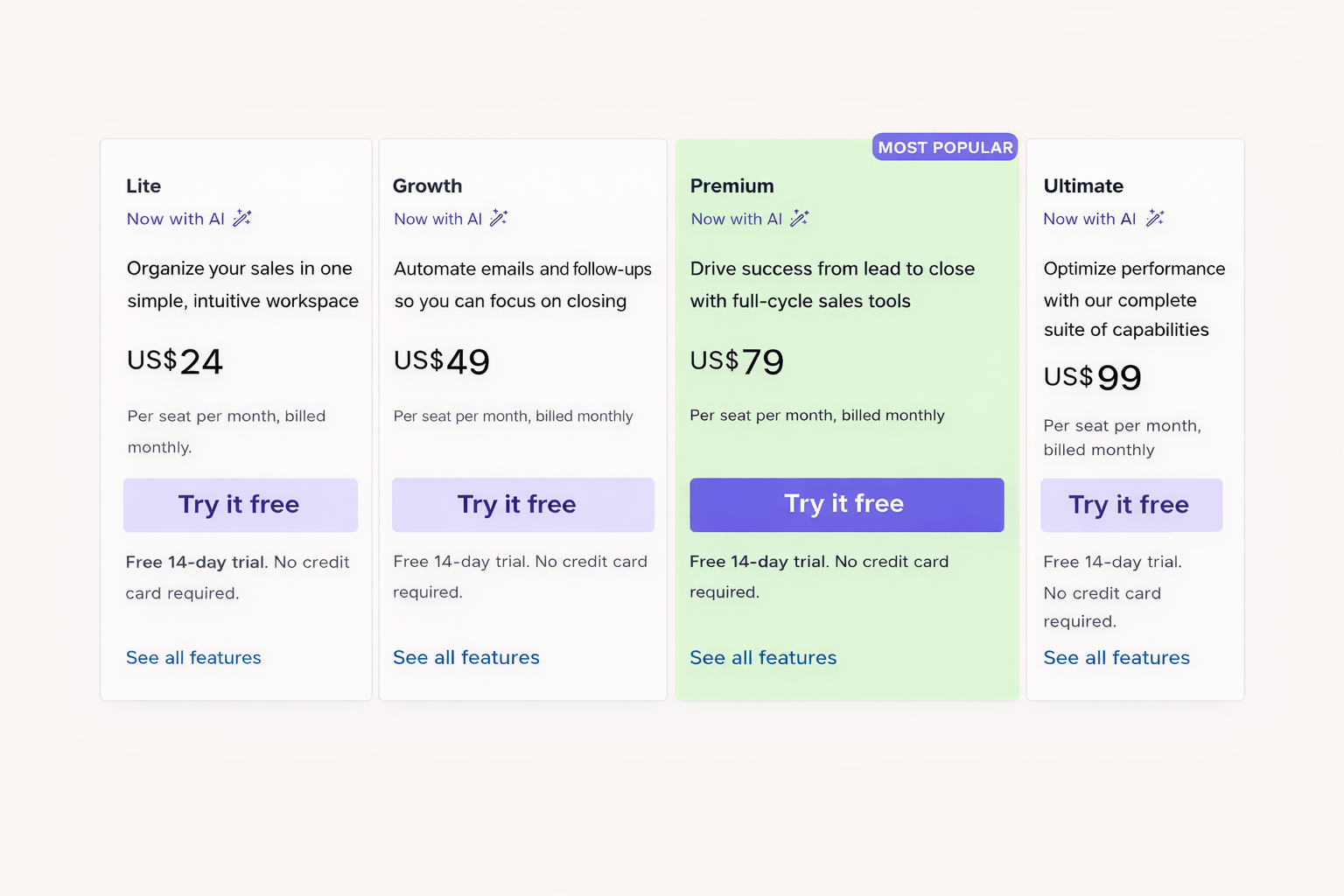
Our cost calculator breaks down the real numbers for teams of different sizes, so you can see exactly where the crossover point is.
A note on plan names: Pipedrive renamed plans in July 2025 (Essential became Lite, Advanced became Growth, Professional became Premium, Enterprise became Ultimate). Both naming conventions still circulate in older articles and forums.
The honest flip side: if you’re already on Premium for other reasons (AI sales assistant, custom permissions, security rules, revenue forecasting), automatic assignment is included at no extra cost. In that case, don’t pay for a third-party tool to replace something you already have.
You probably don’t need anything more if…
This is the part where we tell you not to buy our product.
You probably don't need more than Pipedrive's built-in assignment if:
- Your team is 2-5 reps with similar workloads
- You route deals once at creation and don't re-route during qualification
- Everyone works the same hours in the same timezone
- Round-robin with equal distribution is sufficient
- Email notifications get your reps' attention reliably
- You're already on Premium or Ultimate for other features
- Lead volume is moderate (under ~20/day) and no rep is overwhelmed
- You value zero-additional-tools simplicity
If most of these describe your team, save your money. Pipedrive’s built-in assignment is the right tool. It works, it’s stable, and it doesn’t require managing another vendor relationship.
Signs you might need something more
You might need something beyond built-in assignment if:
- Reps work different shifts, timezones, or schedules
- You've watched leads go cold because the assigned rep was unavailable
- Senior reps should handle more (or different) leads than junior reps
- Deals evolve during qualification and need re-routing when values or fields change
- You're on Lite or Growth and upgrading everyone to Premium isn't justified by other features
- Management needs assignment reports beyond 7 days
- Reps respond faster to Slack, SMS, or WhatsApp than email
- You're growing past 5-6 reps and workload imbalances are becoming visible
These aren’t RouterJet-specific problems. They’re operational problems. Any tool that solves them is worth evaluating, whether it’s ours or someone else’s.
What your options are
If the limitations above do apply to your team, here’s the landscape. We’re keeping this brief because we’ve written detailed comparisons for each.
1. Pipedrive’s built-in automatic assignment. If the limitations above don’t apply, stick with this. Seriously.
2. RouterJet. Purpose-built for Pipedrive. Covers the gaps above: shift-aware routing, escalation, weighted distribution, multi-channel notifications (Slack, SMS, WhatsApp, Telegram), workload awareness. Starts at $10/agent/month and charges only for reps who receive leads. Full feature comparison. Disclosure: this is our product.
3. Insycle. A data management platform with routing as one module. Strong for data hygiene and bulk operations. Lead routing runs on batch processing (hourly), not real-time. If speed-to-lead matters, it’s a different tool for a different problem. Our comparison.
4. Zapier, Make.com, or n8n. DIY automation platforms. Maximum flexibility if you’re willing to build and maintain the workflows yourself. Zapier is the easiest to set up. Make.com and n8n offer more power at lower cost but steeper learning curves. Expect significant ongoing maintenance as your rules grow. Comparisons: Zapier, Make, n8n.
5. Bluebird (formerly Lead Assign). Enterprise-focused, built for teams of 100+ reps with complex hierarchies and territory management. If your team is under 50 reps, it’s more tool than you need. Our comparison.
For a deeper look at all seven approaches (including Chili Piper, which targets a different use case entirely), see our overview of all lead routing options for Pipedrive.
The bottom line
Only you know your team’s complexity. We’ve tried to give you the honest picture, including the parts where Pipedrive’s feature is the right answer.
If you’re hitting the walls described above, explore your options. If you’re not, keep using what works. The best routing tool is the one that matches how your team actually operates, not the one with the longest feature list.
Questions about whether any of this applies to your team? Reach out. We’re happy to give you a straight answer, even if that answer is “you don’t need us.”

Start your free trial
No credit card required.
Assign leads automatically and free up your time.