RouterJet vs Bluebird: Which Lead Routing Tool Is Right for Your Team?
RouterJet and Bluebird aren’t competing for the same buyer: RouterJet routes leads natively inside Pipedrive for small-to-mid sales teams (3–50 reps), while Bluebird is a standalone routing hub designed for enterprise partner networks with 100+ reps.
Full disclosure: RouterJet is our product. We built it, we run it, and we obviously think it’s good. But this article isn’t here to sell you on RouterJet — it’s here to help you figure out which tool actually fits your sales process, even if the answer is Bluebird. We spent time hands-on with Bluebird’s platform so we could write this comparison from real experience, not marketing pages.
The short version
If you need a one-minute answer:
Bluebird is built for large enterprises and partner networks (100+ sales reps) that need a standalone routing platform sitting above their CRM. It shines when leads arrive from many external sources and need to be funneled through a centralized system before hitting Pipedrive CRM.
RouterJet is built for small and medium sized business sales teams (3-50 reps) that already use Pipedrive and want automatic assignment to work natively inside it. It shines when your leads already land in Pipedrive and you need them routed to the right person fast, with real-time notifications that actually get seen.
The rest of this article explains why that distinction matters and walks through the specifics.
The fundamental difference: where routing happens
This is the single most important thing to understand, and everything else flows from it.
Bluebird uses a hub-and-spoke model. Leads come into Bluebird from various sources: an email endpoint, Facebook Lead Ads, Salesforce, Pipedrive, or their API. Bluebird routes them. Then it creates new deals in Pipedrive CRM. Bluebird sits between your lead sources and your CRM as a separate automation tool.
RouterJet works natively inside Pipedrive. Leads, contacts, and deals arrive in Pipedrive through whatever channels you already use (web forms, Zapier, manual data entry, the Pipedrive API). When something matches specific criteria in a routing rule, RouterJet assigns it to the right person automatically.
This architectural difference has real consequences for your sales process:
- Changes in Pipedrive don’t flow back to Bluebird. If you move a deal to a new stage in your sales pipeline, update a custom field, or mark a deal as won in Pipedrive, Bluebird doesn’t know about it. There’s no ongoing sync after the initial lead creation.
- RouterJet can trigger on Pipedrive changes. Because it’s connected directly to Pipedrive, RouterJet can re-route when a deal changes stage, a field gets updated, or a contact is modified. A common setup: route new deals to an intake team, then re-route to a closing team when the deal moves to a qualified stage.
- Team member management works differently. In Bluebird, you set up users separately from your Pipedrive users. In RouterJet, team members sync directly from Pipedrive. Remove someone in Pipedrive and they’re automatically removed from routing.
What this means for your team: If you chose Pipedrive because it’s simple and accessible, adding an external platform on top may work against that simplicity. But if your leads arrive from many sources before they ever touch your Pipedrive CRM, a centralized routing hub may be exactly what your sales processes need.
Feature-by-feature comparison
Automatic assignment rules
| Bluebird | RouterJet | |
|---|---|---|
| Number of rules | One automatic assignment rule | Starter: up to 5. Business: unlimited. |
| Workarounds | Tags can direct leads to a specific user, but tagged leads skip the queue (no escalation) | Multiple rules can handle different lead types, sales pipelines, and stages independently |
| Nested condition groups | No | Yes. Multi-level ALL/ANY logic, up to 3 levels deep. |
| Re-routing on CRM changes | No. Pipedrive changes don’t sync back. | Yes. Stage moves, field updates, and other Pipedrive events can trigger routing. |
This is a significant difference for teams that sort leads into multiple streams. If you route high-value deals differently from standard leads, or if you have an intake team that qualifies leads before passing them to closers, you’ll need multiple automatic assignment rules.
There’s also a difference in condition complexity. Bluebird’s single rule uses flat conditions. RouterJet’s Business plan supports nested condition groups — multi-level ALL/ANY logic up to 3 levels deep — so you can build rules like “region is EMEA AND (deal value is above $50k OR lead source is Partner).” If your routing logic has this kind of layered criteria, you’d need to work around Bluebird’s flat conditions with tags or manual processes.
Escalation and follow-ups
Both tools offer escalation, meaning if a sales rep doesn’t claim a lead, it gets offered to someone else. But the steps work differently.
Bluebird’s approach (Shark Tank): A lead is offered to Alice. She declines. It goes to Bob. He declines. It goes to Charlie. He declines. Then it gets offered to all of them again as a hard reset. If still nobody claims it, it goes to a designated catchall user.
RouterJet’s approach: A lead is offered to Alice. After a configurable time window (1-30 minutes depending on plan), it’s offered to Bob. But Alice can still claim it. The window keeps rolling through all available sales reps. No hard reset, no “round two.”
Neither approach is objectively better. Bluebird’s hard reset and catchall user mean no lead ever sits in limbo permanently. Someone always ends up responsible. RouterJet’s rolling window means a sales rep who was temporarily busy can still grab a lead even after it’s escalated past them.
An honest gap on our side: Bluebird’s catchall user feature is genuinely smart. A lead that nobody claims shouldn’t just sit there—that’s a missed opportunity. We don’t have this yet, and it’s something we want to build.
Notifications
| Channel | Bluebird | RouterJet |
|---|---|---|
| Yes | Yes | |
| SMS | Yes | Yes |
| Slack | No | Yes |
| No | Yes (Business plan) | |
| Telegram | No | Yes |
| Webhook (build your own) | Yes | No |
Bluebird offers a webhook integration for custom notification channels, but you’d need a developer to build something on top of it. RouterJet includes Slack, WhatsApp, and Telegram out of the box, with no coding required.
If your sales team lives in Slack, this matters more than it might seem on a feature checklist.
Shift and availability management
Bluebird has global operating hours. Leads are held back and distributed when working hours begin.
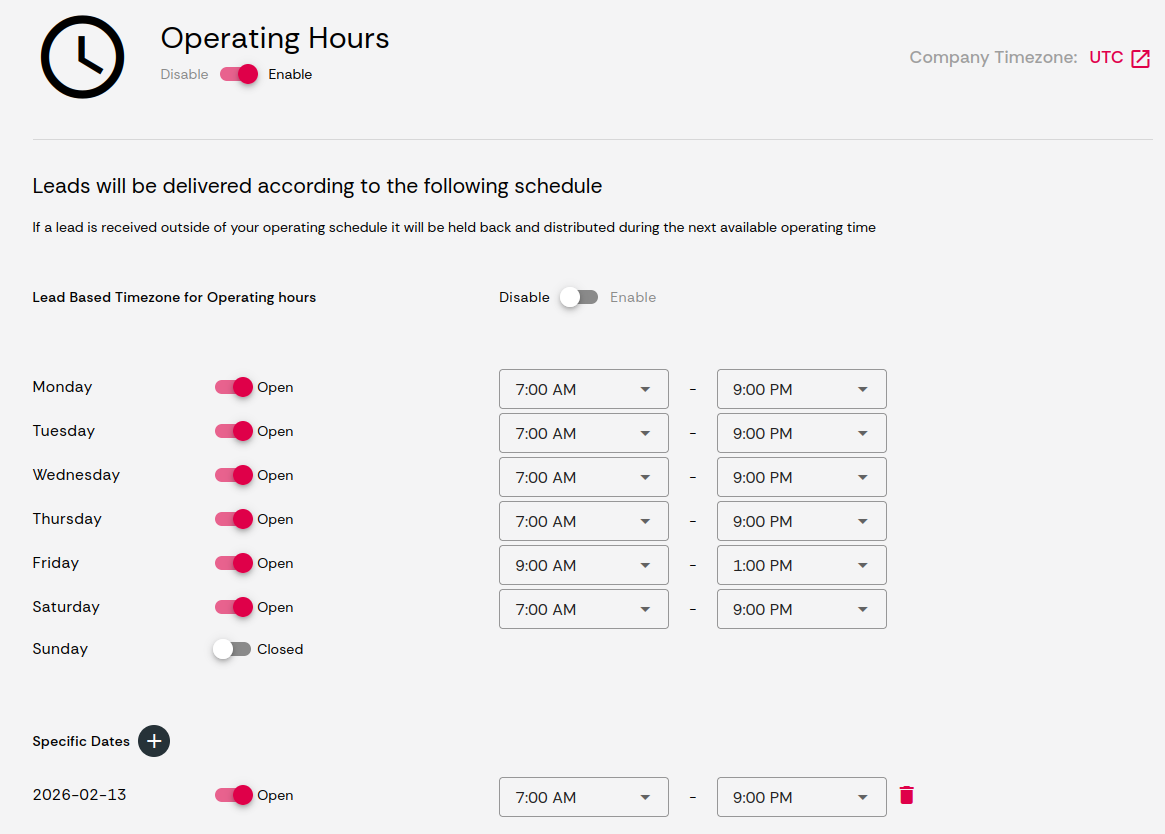
RouterJet has per-user shift management. Each sales rep can have different shifts on different days, with per-shift timezone support. This handles distributed teams where reps in New York, London, and Sydney are all on the same account. One difference worth noting: RouterJet doesn’t hold leads back. If a lead comes in outside a rep’s shift, it still gets assigned but without escalation. Bluebird’s approach of queuing leads until operating hours start may be a better fit if your team strictly doesn’t work leads after hours.
Reporting and analytics
This is an area where Bluebird is ahead of us, and we’ll say so directly.
Bluebird’s dashboard shows acceptance rates, delinquent leads, response times, and other statistics a sales manager genuinely needs to evaluate team performance. It also provides a filterable list of all leads that passed through the system.
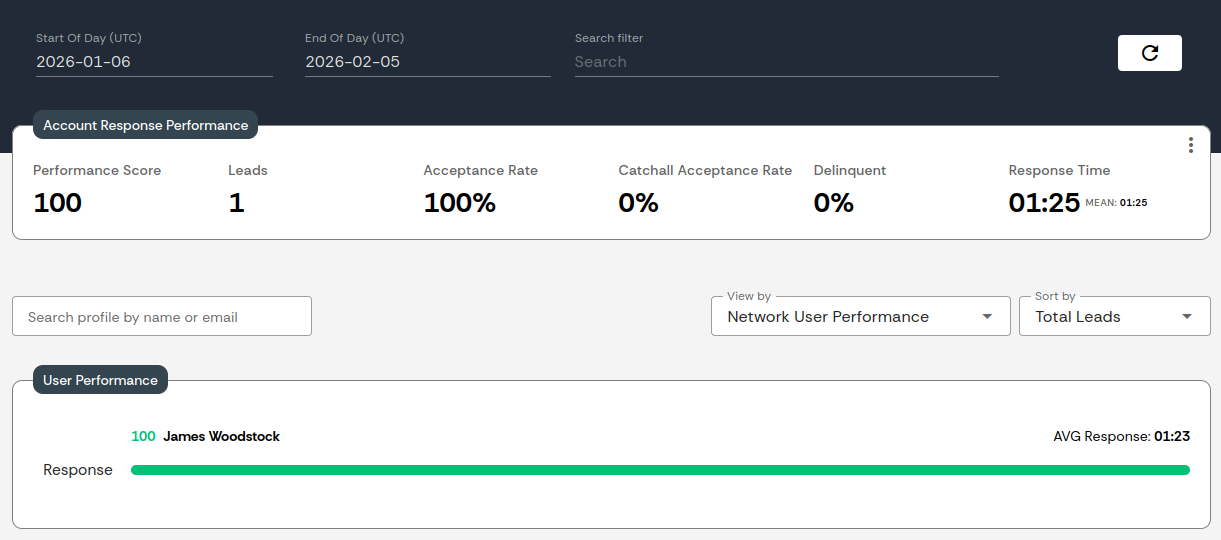
RouterJet’s reporting includes a match dashboard with recent assignments, statuses, and claim times. The Business plan adds scheduled reports (daily, weekly, monthly) with CSV exports. It’s functional, but it’s not as rich as what Bluebird offers.
If detailed routing analytics are a core requirement for your sales leadership, Bluebird’s dashboard is the stronger offering today. That said, RouterJet’s scheduled reports are useful if you want a weekly or monthly summary dropped into your inbox without logging into a dashboard. And reporting is an area we’re actively improving.
Geolocation routing
Bluebird supports geolocation: define a radius where each rep operates, and leads get routed based on location. The map UI for setting agent radius is well done. That said, setup requires writing a regex to parse zip codes from incoming leads. Yes, regex. To extract a zip code. Your sales ops person will need to know that \b\d{5}(?:-\d{4})?\b matches US zip codes—or find a developer who does. The documentation for this feature is thin, which doesn’t help when you’re staring at a regex input field wondering why a tool with a beautiful map UI is asking you to write pattern-matching code from 1968.
RouterJet can do basic territory routing using rule conditions. For example, you can route leads to different teams based on a state or region field in Pipedrive. But it’s more limited than Bluebird’s approach. There’s no map UI, no radius-based assignment, and no automatic geocoding. If you need “route to the nearest rep within 50 miles,” that’s Bluebird. If you need “route all Texas leads to the Texas team,” RouterJet handles that.
Lead sources
Bluebird accepts leads from: email endpoints, Facebook Lead Ads, Salesforce, Pipedrive, and its API. This makes it useful as a central routing layer across multiple platforms.
RouterJet works exclusively within Pipedrive. Your leads need to get into Pipedrive first (via web forms, Zapier, Make, or any other integration), and then RouterJet takes over. This is by design. Pipedrive is meant to be your single source of truth for leads, and adding a second platform where leads live creates two places your reps need to check. If your team already has leads flowing into Pipedrive, RouterJet keeps everything in one place.
Priority and weighting
Bluebird’s Pecking Order: Uses tags (PK_100, PK_200) to create strict tiers. Leads always go to PK_100 users first. If they all decline, leads move to PK_200. This is a hierarchy: always try your best closer first.
RouterJet’s Weighted Routing (Business plan): Assign each sales rep a weight from 0-100. Higher weight means higher probability of receiving leads. This is probabilistic: send most leads to your top closers but spread the rest around for training and development.
The difference: pecking order guarantees your top tier sees every lead first. Weighted routing distributes more broadly while still favoring stronger reps. Pick the one that matches how your team actually operates.
Pricing: the elephant in the room
Let’s be honest, you probably scrolled straight here. Fair enough.
This is where the two tools diverge most dramatically.
| Bluebird | RouterJet Starter | RouterJet Business | |
|---|---|---|---|
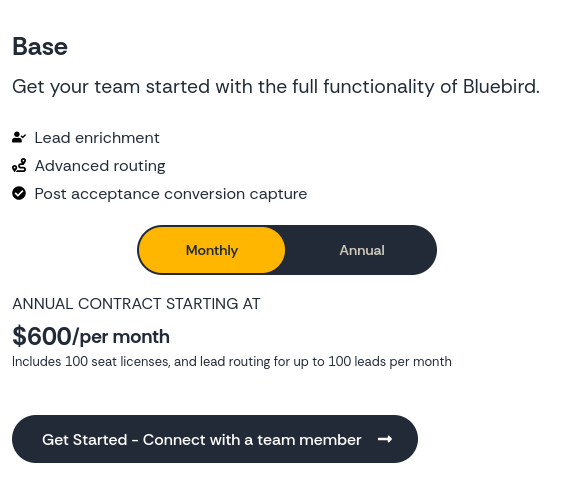
| Base price | $600/month ($5,995/year) | Per agent | Per agent |
| Per-agent cost | Included in base (up to 100 seats) | $10/agent/month | $20/agent/month |
| Lead volume | 100 leads/month included; custom pricing above | No limits | No limits |
| Minimum commitment | $600/month | None | None |
Here’s the per-seat math at different team sizes:
| Team size | Bluebird effective cost/seat | RouterJet Starter | RouterJet Business |
|---|---|---|---|
| 5 reps | $120/seat/month | $50/month total | $100/month total |
| 10 reps | $60/seat/month | $100/month total | $200/month total |
| 25 reps | $24/seat/month | $250/month total | $500/month total |
| 50 reps | $12/seat/month | $500/month total | $1,000/month total |
| 100 reps | $6/seat/month | $1,000/month total | $2,000/month total |
A few things stand out:
For small businesses (under 25 reps), Bluebird’s pricing is hard to justify. Paying $600/month for a 10-person team means paying for 90 seats you’ll never use. That’s not a knock on Bluebird. They’re transparent about targeting larger organizations.
For very large teams (100+ reps), Bluebird’s per-seat cost becomes competitive, and you get the richer analytics dashboard, geolocation, and a platform designed for that scale.
RouterJet has no lead volume limits. Bluebird’s base plan includes 100 leads per month. High-velocity teams will need custom pricing. RouterJet charges per agent regardless of how many new deals flow through.
We want to be fair here: at Bluebird’s price point, you’re getting a genuinely more sophisticated analytics dashboard, geolocation (even if the setup is clunky), and AI-powered routing features. They’re not overcharging. They’re serving a different market. The question is whether your team is in that market.
Think of it as right-sizing. Paying enterprise prices for a 10-person team is like renting a warehouse to store a bicycle. The warehouse might be excellent, but the fit matters more than the features.
It’s also worth doing the lead volume math. Bluebird’s base plan includes 100 leads per month. If you have 100 reps, that’s one lead per rep per month before you’re into custom pricing territory. Most teams of that size are processing hundreds or thousands of leads monthly, so the real cost is likely higher than the sticker price suggests.
Choose Bluebird if…
- You have 100+ reps or channel partners and need routing at that scale
- Your leads arrive from multiple sources outside Pipedrive (Facebook Ads, email endpoints, multiple CRMs) and you need a centralized routing hub
- You want a standalone routing platform that sits above your CRM
- Your budget supports a $600/month minimum and you’ll use most of those 100 seats
- You need detailed routing analytics like acceptance rates, response times, and delinquent lead tracking out of the box
Choose RouterJet if…
- You’re a Pipedrive-first team and want routing that lives inside your existing workflow
- You have 3-50 reps and need routing that scales with your team, not a fixed enterprise minimum
- You need multiple routing rules for different lead types, re-routing on stage changes, or intake-to-closing handoffs
- Your routing logic requires nested conditions (e.g., “region is X AND (deal value > Y OR source is Z)”)
- Your reps need notifications on Slack, WhatsApp, or Telegram, not just email and SMS
- You want per-user shift management with timezone support for a distributed team
- You need Pipedrive changes (stage moves, field updates) to trigger re-routing
- Your budget is better served at $10-20/agent/month with no lead volume caps
What we honestly wish we had
In the spirit of transparency, here’s what Bluebird does that we’d like to do better:
- Catchall user. A designated person who receives leads that nobody else claims. No lead should sit in limbo. This is on our radar.
- Richer analytics. Bluebird’s dashboard gives sales managers a clearer picture of routing performance. Our reporting works, but it isn’t at that level yet.
- Full geolocation routing. We can route by territory using rule conditions (e.g., by state), but we don’t have map-based radius assignment or automatic geocoding. For teams that need proximity-based routing, Bluebird is ahead.
We’d rather tell you what we can’t do than have you find out after signing up.
The bottom line
Bluebird and RouterJet aren’t really competing for the same buyer. Bluebird built a powerful platform for enterprise partner networks that need centralized routing across many lead sources. RouterJet built a focused tool for Pipedrive sales teams that need fast, flexible, native lead assignment.
The right choice depends on your team size, where your leads come from, how tightly you want routing integrated with Pipedrive, and what you’re comfortable paying.
Both tools offer free trials. If you’re genuinely unsure, test both with your actual workflow and see which one fits.

Start your free trial
No credit card required.
Assign leads automatically and free up your time.