RouterJet vs Insycle: Pipedrive Lead Routing Compared
RouterJet routes Pipedrive leads in seconds with built-in notifications and escalation, while Insycle assigns records in hourly batches as part of a broader data management platform. They solve different problems, and the right choice depends on which problem you actually have.
This isn’t an apples-to-apples comparison. Insycle is a data management platform. Its core strengths are deduplication, data cleansing, bulk operations, and associating records. Assignment is one module inside a much larger toolkit. RouterJet is a purpose-built lead routing tool for Pipedrive. Assignment is the entire product.
That difference shapes everything: how rules work, how fast assignments happen, what notifications look like, and how much you pay.
Full disclosure: We make RouterJet. We built it, we run it, and we think it’s good. But this article is here to help you figure out which tool actually fits your workflow, even if the answer is Insycle. We’ll be straight about where they have genuine advantages.
The quick version
If you’re scanning, here’s the side-by-side:
| Feature | RouterJet | Insycle |
|---|---|---|
| Primary purpose | Lead routing | Data management (routing is an add-on) |
| Entity types | Deals, Leads, People | People, Organizations, Deals |
| Assignment speed | Real-time (seconds via webhooks) | Batch (hourly at fastest) |
| Round robin | Yes | Yes |
| Weighted routing | Yes | Yes |
| Balanced (load-based) | No | Yes |
| Random | Yes | Yes |
| Availability/shifts | Yes | Yes |
| Cap per rep | No | Yes |
| Escalation | Yes (configurable, down to 1 min) | No |
| Notifications | Email, SMS, Slack, WhatsApp, Telegram | No built-in notifications |
| Offer claiming | Yes | No |
| Rule conditions | AND/OR in UI, contains, within, etc. | AND default, OR via advanced syntax, regex available |
| Pricing model | Per seat ($10-$20/agent/mo) | Per record count (base plan + add-on) |
The rest of this article explains why each difference matters and helps you decide which tool fits your team.
Speed: the biggest practical difference
RouterJet processes assignments in seconds. A webhook fires when a new deal, lead, or contact enters Pipedrive. RouterJet evaluates your rules, assigns the right owner, and sends a notification. The entire cycle, from form submission to rep notification, typically completes in under 10 seconds.
Insycle runs assignments on a schedule. Hourly is the fastest option.
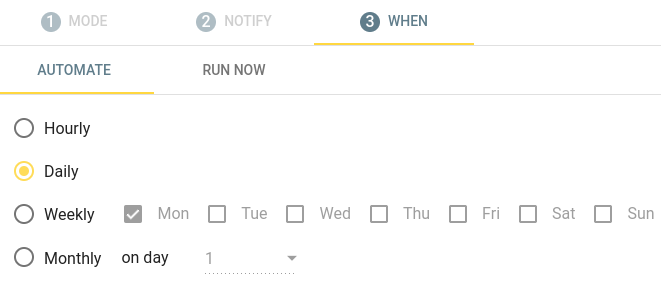
This is by design, not an oversight. Insycle is a batch processing tool built for data management. Batch scheduling makes sense for deduplication, cleansing, and rebalancing. It doesn’t make sense when a prospect just filled out your demo request form.
Here’s the honest framing: if you’re cleaning up historical data or rebalancing assignments monthly, hourly processing is fine. If a new lead comes in at 2:01pm and your rep doesn’t get notified until 3:00pm, that’s a problem. Research consistently shows that response time directly impacts conversion rates. The first rep to respond wins the deal more often than not.
If speed-to-lead matters to your team, this one difference may be the whole decision.
Entity types: what can each tool route?
Neither tool covers every Pipedrive entity, and it’s worth understanding where each has a gap.
RouterJet routes: Deals, Leads, People. Missing: Organizations.
Insycle routes: People, Organizations, Deals. Missing: Leads.
RouterJet’s gap (Organizations) matters less for most lead routing use cases. Organizations typically don’t need automatic assignment the way individual prospects do.
Insycle’s gap (Leads) matters more. Pipedrive’s Leads Inbox is where many inbound prospects land before qualification. If your team uses the Leads Inbox as the front door for new business, Insycle can’t route those records.
One area where Insycle has a clear advantage: multi-CRM support. Insycle works across HubSpot, Salesforce, and Pipedrive. If you operate across multiple CRMs and want one tool for assignment, that could matter. RouterJet is Pipedrive-only by design.
Assignment methods compared
Round robin
Both tools have it. RouterJet calls it “round robin” and tracks last-assigned to ensure fairness across runs. Insycle calls it “Even” and works similarly, remembering position between batch executions. No meaningful difference here.
Weighted routing
Both tools handle weighted routing the same way. You assign a weight to each owner, and leads are distributed proportionally. Set Alice to 60 and Bob to 40, and over time roughly 60% of leads go to Alice. No meaningful difference here.
Balanced / load-based (Insycle only)
This is Insycle’s standout assignment method. Balanced routing looks at how many records were assigned to each rep over a given time period and distributes new records to equalize it. If Jane was assigned 10 deals this week and John was assigned 5, the next batch gives John more.
RouterJet doesn’t have this. And we’ll be direct: it’s a smart feature. Round robin ensures each rep gets the same number of new assignments going forward, but it doesn’t account for how assignments have been distributed over a longer period. If a rep was out sick for a few days and missed assignments, round robin won’t catch them up. Balanced routing will.
If your team cares about evening out assignment counts over time rather than strict per-assignment fairness, this is a genuine Insycle advantage.
Random
Both tools support random assignment. Insycle has a dedicated “Random” mode. RouterJet achieves the same result by setting equal weights on all owners in a rule. Functionally identical.
Neither approach guarantees even distribution over time. That’s what round robin is for. Random assignment has limited practical value for most teams.
Cap per rep (Insycle only)
Insycle lets you limit the maximum number of assignments per rep within a given period.
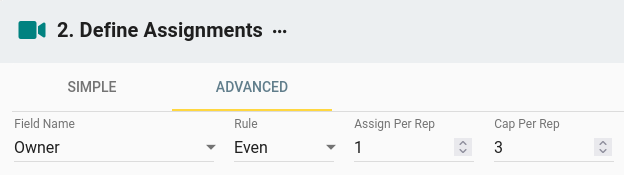
RouterJet doesn’t have this natively. If your team has hard capacity limits, where a rep physically can’t handle more than X new leads per day, Insycle’s cap is useful. Most teams manage capacity through shift scheduling and availability toggles instead, but if you need a hard ceiling, it’s there.
Rules and conditions
RouterJet’s rule builder
RouterJet provides a visual rule builder with AND/OR logic in the UI. Operators include equals, not equals, greater/less than, contains, doesn’t contain, empty, not empty, within, and not within. Rules work with both standard and custom Pipedrive fields. Nested condition groups (up to 3 levels deep) let you build rules like “region is EMEA AND (deal value is above $50k OR lead source is Partner)” without leaving the UI.
The goal: a sales manager can set up routing rules without technical help.
Insycle’s filter system
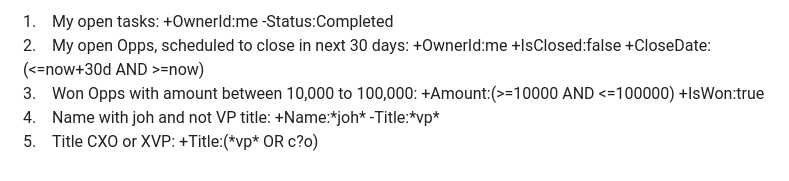
Insycle uses filters as the starting point. You pick a field and a condition. The basic mode is straightforward but limited. AND logic is the default for combining conditions. OR logic requires switching to an advanced syntax mode and removing + characters from the filter syntax. Power users get regex support and pipe-separated contains matching (e.g., CU|FCU|CMNTY to match multiple values in a single field).
The tradeoff
Overall, RouterJet’s rule builder is more powerful for the kind of conditions sales teams actually need. Nested AND/OR groups, a full set of operators, and a visual UI mean you can build complex routing logic without learning a query syntax. Setting up “route enterprise deals from California to Alice, and SMB deals from Texas to Bob” takes a few clicks.
Insycle’s filter system is more limited for multi-condition rules, but it does have a couple of power-user tricks RouterJet doesn’t: regex matching and pipe-separated contains (e.g., CU|FCU|CMNTY). If your Pipedrive fields contain inconsistent data, like “California” and “CA” and “Calif.” in the same state field, regex can handle all three in one filter. Most Pipedrive teams won’t need that for routing, but it’s there if you do.
Notifications and escalation
This is where the “purpose-built routing tool” vs “data management add-on” difference shows up most clearly.
RouterJet notifications
Five channels: Email, SMS, Slack, WhatsApp, and Telegram. Each is configurable per owner and per rule. You can set each channel to Always, Never, or On Shift, so a rep gets Slack messages during work hours and SMS only for after-hours emergencies.
RouterJet also includes an offer claiming workflow. A rep gets a notification with a claim link. They click to claim the lead, and Pipedrive is updated automatically.
And if no one claims? Escalation kicks in. After a configurable time window (down to 1 minute on the Business plan, 30 minutes on Starter), the offer moves to the next available owner. No lead sits unclaimed.
Insycle notifications
Insycle has no built-in notification system. No escalation. No offer claiming.
When Insycle assigns an owner to a record, the rep finds out through Pipedrive’s own notifications (if they’ve configured them) or by checking their pipeline manually.
This isn’t a missing feature. It’s a fundamental architectural difference. Insycle batch-processes assignments on a schedule. There’s no concept of “waiting for a claim” in a tool that runs hourly. Notifications and escalation require real-time processing, and that’s not what Insycle was designed for.
If your team relies on instant notifications and can’t afford leads sitting unclaimed, this difference matters more than any other on this list.
Pricing: different models for different needs
RouterJet and Insycle price their products in fundamentally different ways because they serve fundamentally different purposes.
RouterJet pricing
Simple per-seat model:
| Plan | Cost | Includes |
|---|---|---|
| Starter | $10/agent/month | Email, SMS, Telegram, Slack notifications; round-robin routing; shifts; escalation (30-min minimum) |
| Business | $20/agent/month | All notifications (including WhatsApp); weighted routing; nested condition groups; escalation (1-min minimum) |
A 10-person team pays $100-$200/month. No lead volume limits, no record-count calculations. 14-day free trial with full features.
Insycle pricing
Record-based pricing. The base plan starts low for small databases, but scales with your total record count. The Assign module is an add-on on top of the base plan. Your actual cost depends on your database size.
What you’re actually paying for
This is the key question. With Insycle, you’re buying a data management platform. Assignment is a fraction of what the tool does. You also get deduplication, data cleansing, bulk operations, field standardization, and record association. If you need those capabilities, the bundle could be reasonable. You’re paying for a suite, not just a router.
If routing is your only problem, though, you’re paying for capabilities you won’t use. RouterJet’s pricing is transparent and predictable: your cost scales with your team size, not your database size, and every dollar goes toward the routing problem you’re trying to solve.
When Insycle makes more sense
We’d genuinely recommend Insycle if:
- You already use Insycle for data management. You’re deduplicating records, cleansing fields, or running bulk operations, and you want to add assignment without bringing in another tool. Adding a module to an existing platform makes sense.
- You need to route Organizations. RouterJet doesn’t route Organizations. If that’s a requirement, Insycle covers it.
- You need balanced, load-based distribution. Insycle’s balanced routing equalizes workload over time. RouterJet doesn’t have this. If long-term workload equity matters more than per-assignment speed, this is a real advantage.
- You need regex-level filtering for messy field data. Inconsistent data entry is a reality in many CRMs. Insycle’s regex and advanced filter syntax handle it well.
- You operate across multiple CRMs. Insycle works with HubSpot, Salesforce, and Pipedrive. If you need one assignment tool across platforms, RouterJet can’t help.
- Hourly assignment timing is fine for your workflow. Not every team competes on speed-to-lead. If your sales cycle is measured in weeks or months, batch processing may work perfectly well.
- You want cap-per-rep limits. Hard capacity limits per rep are built into Insycle. RouterJet doesn’t offer this today.
When RouterJet makes more sense
RouterJet is the better fit if:
- Speed-to-lead is critical. You need assignments in seconds, not hours. Every minute between form submission and rep response affects your conversion rate.
- You want reps notified instantly. Slack, SMS, WhatsApp, Telegram, or email, configured per rep, per rule, with no external tools to set up.
- You need escalation. If a rep doesn’t claim a lead within your configured window, it automatically moves to the next person. No leads sit unclaimed.
- You need to route Pipedrive Leads. Insycle can’t route records from Pipedrive’s Leads Inbox. If your inbound flow starts there, RouterJet handles it.
- You want a visual rule builder designed for sales managers. AND/OR logic, nested condition groups, and operators like “contains” and “within,” all in a point-and-click UI. No syntax to learn.
- You’re a Pipedrive-focused team. RouterJet is built exclusively for Pipedrive with deep, native integration. Your team members sync automatically. Your custom fields are available in rules.
- You want transparent per-seat pricing. $10 or $20 per agent per month. No record-count calculations, no add-on modules, no surprises when your database grows.
The bottom line
Insycle is a data management platform that can assign leads. RouterJet is a lead routing tool. Both work with Pipedrive, but they solve different problems.
If your main challenge is “leads come in and we need them routed to the right rep, fast, with notifications and escalation,” that’s what RouterJet was built for. Real-time webhooks, five notification channels, configurable escalation, and a rule builder designed for sales teams.
If your main challenge is “our Pipedrive data is messy and we need to clean, deduplicate, and reorganize it, and we’d also like to assign records while we’re at it,” Insycle is the better fit. You’re solving a data problem, and assignment is one piece of a larger cleanup.
Both tools offer free trials. Try the one that matches your primary problem. You’ll know within an afternoon which approach fits how your team actually works.
Choose Insycle if:
- You already use Insycle for data management
- Hourly batch processing fits your sales cycle
- You need balanced/load-based distribution
- You operate across multiple CRMs
- You need regex filtering for messy data
Choose RouterJet if:
- Speed-to-lead matters (seconds, not hours)
- You need instant notifications on Slack, SMS, or WhatsApp
- Unclaimed leads cost you money (escalation matters)
- You route from Pipedrive's Leads Inbox
- You want a visual rule builder, not filter syntax
- Predictable per-seat pricing matters
Try both if you’re unsure. RouterJet has a 14-day free trial. Insycle offers a trial as well. Set up equivalent routing in each and see which fits your team.
Questions? Reach out at support@routerjet.com. We’re happy to talk through whether RouterJet, or something else entirely, is right for your team.

Start your free trial
No credit card required.
Assign leads automatically and free up your time.