Pipedrive Automatic Assignment vs RouterJet: Complete Feature Comparison
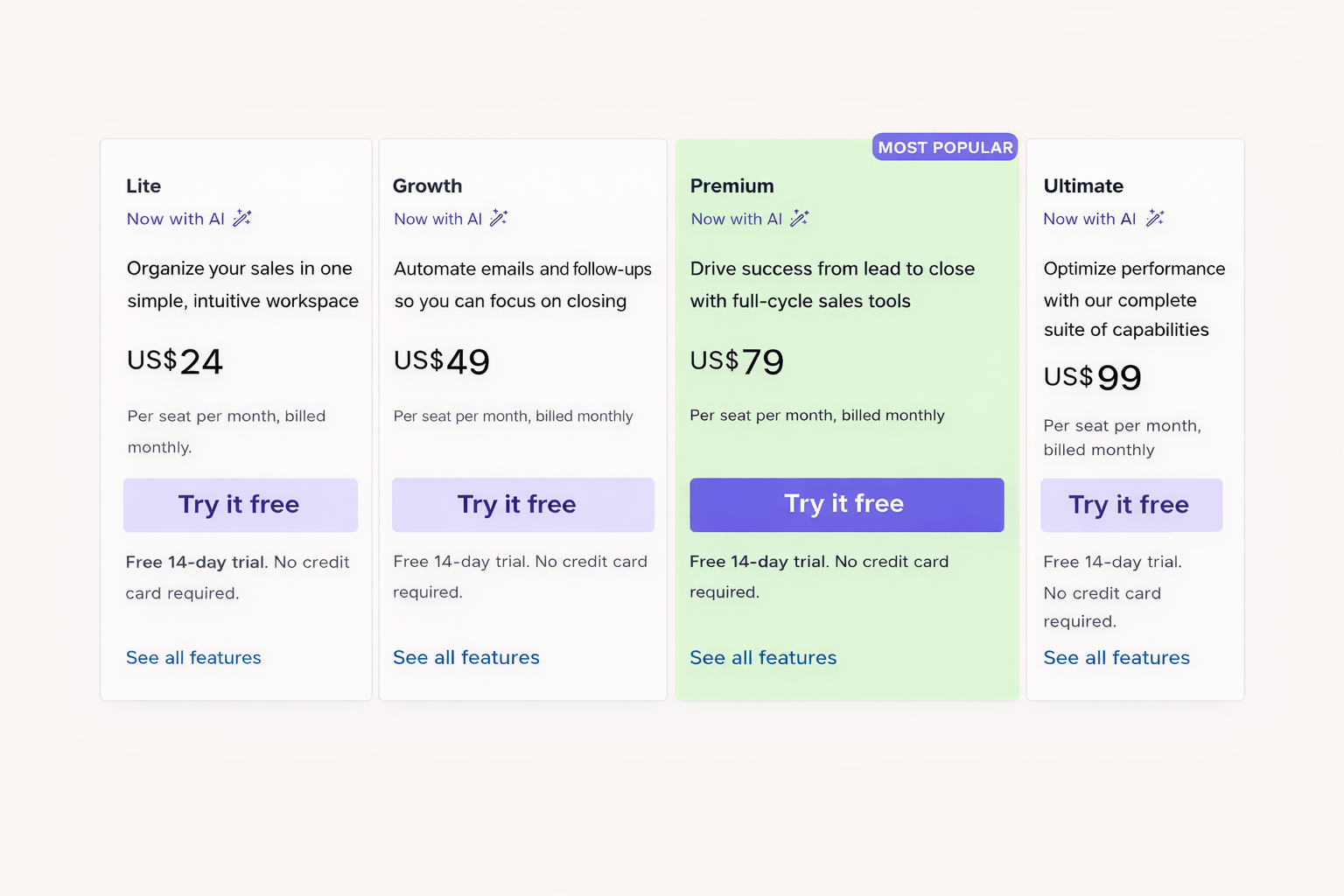
Pipedrive’s automatic assignment routes deals once at creation with basic round-robin — and that’s where it stops. No re-routing when deals update during qualification, no shift-aware scheduling, no escalation for unclaimed leads, no weighted distribution, no SMS or Slack or WhatsApp notifications. It requires Pipedrive’s Premium plan at $79/seat. RouterJet does all of this starting at $10/user.
But Pipedrive’s feature does work for some teams, and we’d rather help you pick the right tool than sell you something you don’t need. If you’re wondering whether you actually need RouterJet when Pipedrive already has automatic assignment, here’s how to tell which side of the line you’re on.
The 30-second version: Pipedrive’s automatic assignment works well for teams that route deals once at creation, work similar hours, and don’t need escalation workflows. RouterJet is for teams where leads evolve during qualification, reps span timezones, and speed-to-lead directly affects revenue. Pipedrive’s feature requires their Premium plan ($79/seat). RouterJet is a separate tool starting at $10/user. (Want the cost breakdown? See our pricing comparison.)
When Pipedrive’s Automatic Assignment Is Enough
Pipedrive CRM launched automatic assignment as part of their workflow automation features in April 2023, and for many sales teams it works perfectly well. You probably don’t need RouterJet if:
- You only need to route deals when they’re first created (not when they’re updated)
- Simple round-robin distribution across your team meets your needs
- Your team members work similar hours and you don’t need shift-aware routing
- You’re already using Pipedrive’s Teams feature and want assignment tied to that structure
- You don’t need escalation workflows for unclaimed leads
If that describes your situation, save your money and use what’s already included in your Pipedrive subscription.
For everyone else, here’s where the two solutions differ.
What Triggers Routing?
This is the most significant difference between the two platforms.
Pipedrive routes new deals when they’re added or when they change stage. It routes leads only when they’re added—not when they’re updated.
RouterJet routes deals, leads, and contacts when they’re added or updated, regardless of what field changed.
Why does this matter? Here’s a scenario we hear constantly:
Your sales team has a rule: deals over $50,000 go to senior reps. Makes sense—big deals need experienced hands.
A new lead comes in through your web form. No value listed yet. It lands in your sales pipeline for qualification. Your SDR has a great discovery call. Turns out this is a $75,000 opportunity. They update the deal value and… nothing happens.
With RouterJet: The moment that value hits $75,000, the deal moves to your senior team. Automatically.
With Pipedrive: The deal stays put. The pipeline stage didn’t change, so the routing rule never fires. Three days later, the prospect emails asking why nobody followed up.
This update-trigger gap means Pipedrive users often create duplicate rules (one for “deal added,” another identical one for “deal updated”) to catch deals that evolve into matching a rule. Even then, you’re limited to stage changes triggering the update rule.
There’s a related gap in condition logic. Pipedrive’s automatic assignment uses flat condition lists — every condition is evaluated at the same level. RouterJet supports multi-level ALL/ANY condition groups (up to 3 levels deep), so you can build rules like “region is EMEA AND (deal value is above $50k OR lead source is Partner).” Without nested groups, expressing that kind of logic in Pipedrive means splitting it across multiple rules and hoping they don’t conflict.
What Can You Route?
Pipedrive routes deals and leads.
RouterJet routes deals, leads, and contacts.
If you need to assign incoming contacts to reps—say, for account management or customer success workflows—RouterJet handles that. Pipedrive’s automatic assignment doesn’t cover contacts at all.
How Does Assignment Work?
Both platforms support round-robin distribution across a group of team members. The difference is in how you define those groups.
Pipedrive assigns to individual users or to Teams (a Pipedrive feature requiring their Premium plan). If you already organize your reps into Pipedrive Teams, this integration is convenient.
RouterJet lets you create ad-hoc groups of users for any rule. You’re not locked into your existing team structure—you can create routing groups that cut across teams or include only specific reps from different teams.
Pipedrive also offers a useful shortcut: assigning a deal to the “organization owner” or “person owner.” This is handy for ensuring deals go to whoever already owns the related company or contact. RouterJet doesn’t currently offer this—it falls more into general CRM automation territory than lead assignment specifically. We’re not building a Swiss Army knife that handles updating fields, sending emails, or syncing data between systems. We do one thing: get the right lead to the right rep before your competitor does. That said, if customers tell us owner-based assignment would help their routing workflows, we’d consider adding it.
What Happens When Multiple Rules Match?
Pipedrive’s approach: If a deal matches the same rule twice (say, after being updated), it gets reassigned—which could pull a deal away from a rep who’s actively working it. If a deal matches multiple different rules, only the first matching rule runs, even if that rule has already been applied and would do nothing.
RouterJet’s approach: If a deal matches the same rule twice, subsequent matches are ignored—the rep keeps the deal. Deals can match multiple different rules, though most customers do not enable this because reassignment mid-cycle is rarely desirable.
What About Unclaimed Leads?
Here’s the scenario that keeps sales managers up at night: A hot new deal comes in. It gets assigned to a rep who’s in back-to-back meetings. Or on PTO. Or just having an off day. The lead sits. And sits. By the time someone notices, the prospect has already talked to your competitor.
Pipedrive’s automatic assignment doesn’t solve this. Leads go out, and if nobody acts on them, they sit.
RouterJet was built for exactly this problem:
Re-offer unclaimed leads to the next available rep after a set time. No leads fall through the cracks.
Route leads only to reps who are currently working, based on their configured hours and timezone.
Reps can mark themselves temporarily unavailable without anyone touching the routing rules.
Activate or deactivate reps from routing with one click for onboarding, PTO, or performance issues.
Pipedrive’s automatic assignment has none of these. Leads go out, and if nobody acts on them, they sit.
Notification Channels
Pipedrive lets you create additional automations to notify reps via email.
RouterJet notifies via email, SMS, Slack, Telegram, and WhatsApp:
Each channel can be configured independently—always send, never send, or only send when the rep is on shift.
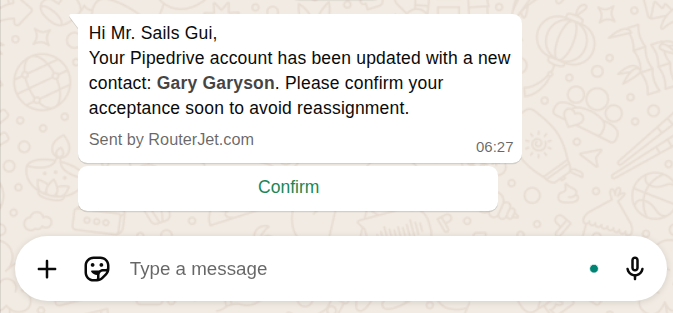
For teams where reps aren’t glued to their Pipedrive inbox, multi-channel notifications mean responses in minutes, not hours.
What Pipedrive Does Better
We should be honest: Pipedrive’s automatic assignment beats RouterJet in a few areas.
- More routing fields: Pipedrive lets you route based on both default and custom fields for the entity, which is more than RouterJet currently supports. If you need routing logic based on an obscure field, Pipedrive may cover it when we don’t.
- Related entity routing: Pipedrive can route a deal based on attributes of the associated organization or person—not just the deal itself. RouterJet routes each entity type based only on its own attributes.
- Descriptions for rules: Pipedrive lets you add descriptions to your rules. RouterJet doesn’t have this yet (and we should).
The Full Picture
| Capability | Pipedrive | RouterJet |
|---|---|---|
| Route deals | ✓ | ✓ |
| Route leads | ✓ (add only) | ✓ (add and update) |
| Route contacts | ✗ | ✓ |
| Trigger on any field update | ✗ (stage changes only) | ✓ |
| Nested condition logic | ✗ | ✓ |
| Round-robin | ✓ | ✓ |
| Weighted distribution | ✗ | ✓ |
| Shift-aware routing | ✗ | ✓ |
| Escalation workflows | ✗ | ✓ |
| Snooze/out-of-office | ✗ | ✓ |
| SMS notifications | ✗ | ✓ |
| Slack notifications | ✗ | ✓ |
| WhatsApp notifications | ✗ | ✓ |
| Route on org/person attributes | ✓ | ✗ |
| Assign to org/person owner | ✓ | ✗ |
| Rule descriptions | ✓ | ✗ |
| Included in Pipedrive | ✓ | ✗ (separate subscription) |
For a detailed cost analysis with real-world scenarios, see our pricing comparison.
Which Solution Fits Your Team?
Stick with Pipedrive if:
- You route deals at creation only, not based on updates during qualification
- Your team works similar hours without timezone complexity
- Round-robin is sufficient—you don't need weighted distribution or escalation
- Email notifications are enough to get your reps' attention
- You want to avoid adding another tool to your stack
RouterJet fits if:
- Speed-to-lead affects your close rate and you can't afford unclaimed leads
- Deals evolve during qualification and need to route when values or attributes change
- Your sales team spans timezones and reps shouldn't get new leads at 2am
- Your reps respond faster to SMS or Slack than email
- You need to route contacts, not just deals and leads
- You've outgrown simple round-robin and need weighted distribution
One More Thing
Pipedrive’s automatic assignment hasn’t been updated since its April 2023 launch. For Pipedrive, it’s a checkbox feature. For us, lead routing is all we do, and we’re constantly improving based on customer feedback.
If Pipedrive’s feature covers your needs today, use it. Seriously. Adding tools you don’t need creates complexity in your sales process, not value.
But if you’ve read this far and kept nodding—if unclaimed leads, timezone chaos, or qualification-stage routing gaps sound familiar—start a free trial and see the difference in your first week.

Start your free trial
No credit card required.
Assign leads automatically and free up your time.