How to Test Rules Before Saving
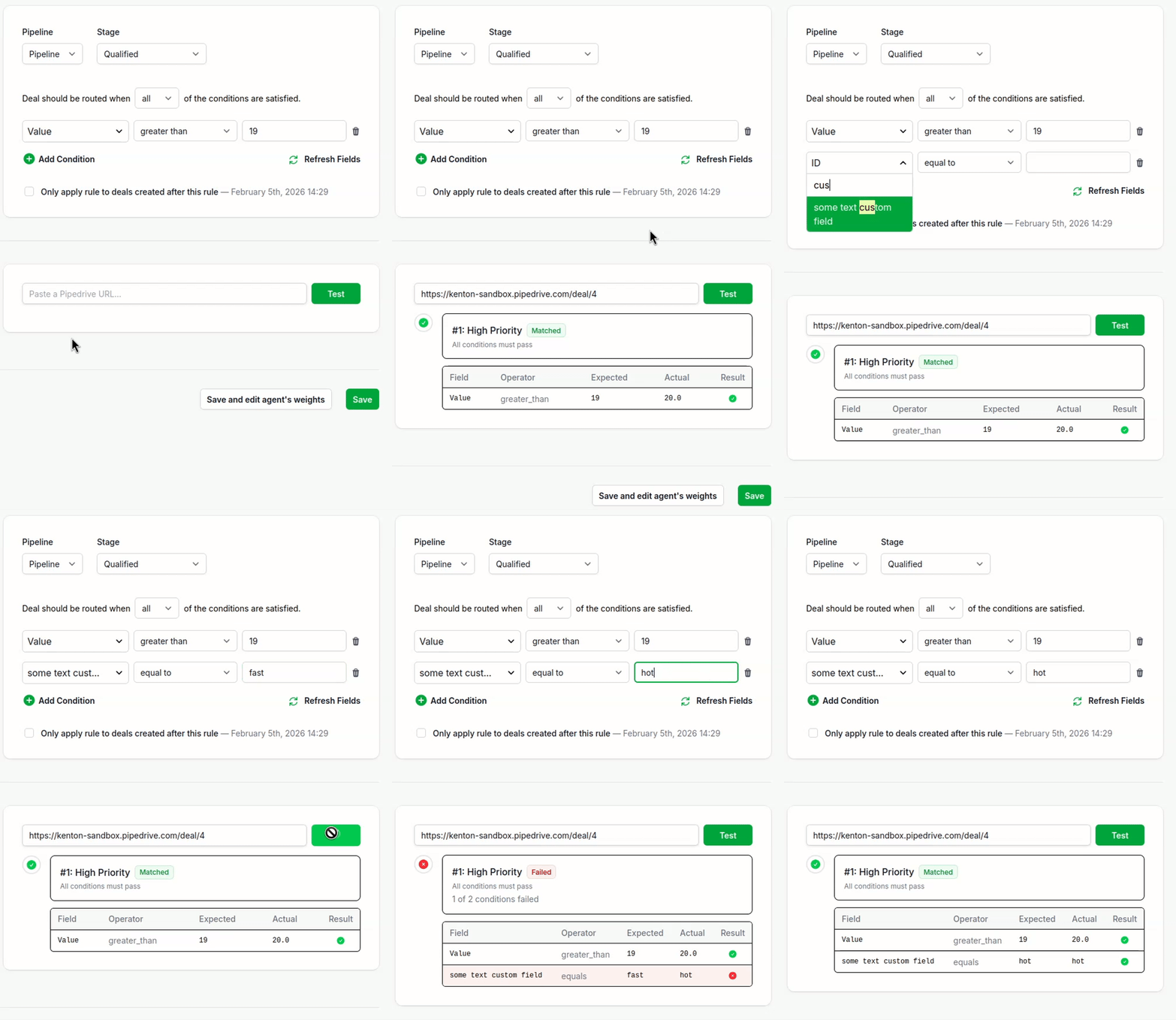
You can test any rule directly from the edit form—without saving anything. Paste a Pipedrive URL, click “Test,” and see instantly whether your conditions match. Nothing goes live until you’re ready.
This is useful when you’re building new rules or tweaking existing ones. Instead of saving, testing, and fixing in a loop, you can iterate on your conditions and verify they work before committing.
For debugging rules that are already live, see How to Debug Routing with the Inspector.
How to Test a Rule
1) Open the Rule Form
Go to Rules and either edit an existing rule or create a new one.
2) Make Your Changes
Set your conditions, pipeline, stage, and other settings. Don’t save yet.
3) Paste a Pipedrive URL
Scroll to the “Test Rule” section at the bottom of the form. Paste the URL of a deal, lead, or person from Pipedrive:
yourcompany.pipedrive.com/deal/123yourcompany.pipedrive.com/person/456yourcompany.pipedrive.com/leads/inbox/abc123...
4) Click “Test”
The result appears inline—no page reload, no save.
5) Read the Result
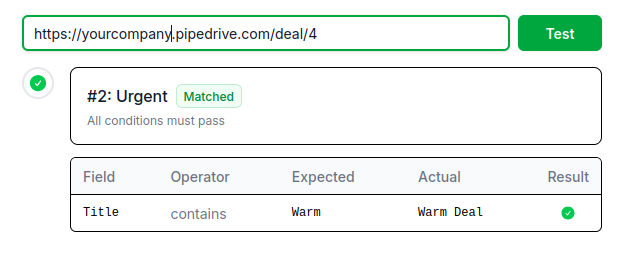
You’ll see one of three outcomes:
- Matched (green) — All conditions passed. This rule would route this record.
- Failed (red) — One or more conditions didn’t match. You’ll see exactly which ones failed and why.
- Skipped (gray) — The rule wouldn’t evaluate this entity (wrong entity type, wrong pipeline/stage, rule disabled, etc.).
For Matched and Failed results, you get a condition-by-condition breakdown:
| Field | Operator | Expected | Actual | Result |
|---|---|---|---|---|
| Title | contains | Warm | Warm Deal | Pass |
| Value | greater than | 1000 | 500 | Fail |
6) Adjust and Re-test
Change a condition, click “Test” again. The new result replaces the old one. Keep iterating until you’re confident, then save.
Why This Matters
No risk to live routing. Your production rules keep running while you experiment. No accidental misfires.
Test new rules before they exist. Build conditions, verify against real records, and only save once you’ve confirmed the rule works.
Real data, real results. The test fetches live field values from Pipedrive—not a cached snapshot.
Faster debugging. When a condition fails, you see the field name, what you expected, and what the actual value was. No guesswork.

Start your free trial
No credit card required.
Assign leads automatically and free up your time.