Never Let a Hot Lead Go Cold with Escalation
It’s 4:47 PM on a Tuesday. A high-intent lead fills out your demo request form. Your top rep is wrapping up a call. Your second-best is in a meeting. The lead notification pops up, but nobody’s watching. By the time someone sees it—maybe tomorrow morning—that prospect has already booked a demo with your competitor.
Sound familiar? You’re not alone. Research consistently shows that responding to leads within the first five minutes dramatically increases conversion rates. After 30 minutes, your odds of qualifying that lead drop by 21x. Yet most sales teams have no systematic way to ensure leads don’t fall through the cracks when everyone’s busy.
That’s exactly what escalation solves.
What is Escalation?
Escalation is RouterJet’s automated offer rotation system. When a lead comes in and matches one of your rules, the system offers it to an available team member. If that person doesn’t accept within your configured time window, the system automatically re-offers it to the next available person. This continues until someone claims it.
Think of it as a safety net for your leads. No more “I thought someone else had it.” No more leads sitting unassigned while your team assumes somebody else is handling them.
The key difference:
- Standard (Non-Escalated): Single offer to one owner. If they don’t accept, the lead sits assigned but unworked.
- Escalated: Continuously re-offers to different owners at your set interval until someone accepts.
How It Works
Here’s the escalation cycle:
- Trigger: A deal, lead, or contact arrives via Pipedrive webhook and matches a rule with escalation enabled
- First Offer: RouterJet selects an available owner based on your routing method (round-robin or weighted) and sends notifications through your configured channels
- Wait Period: The system waits for your configured escalation interval (e.g., 5 minutes)
- Re-offer: If no one has accepted, RouterJet automatically offers the lead to the next available team member
- Repeat: This cycle continues until someone accepts or all owners go offline
Example: You have escalation set to 5 minutes with three reps: Sarah, Mike, and Alex. A lead comes in at 2:00 PM. Sarah gets the first offer but she’s on a call. At 2:05 PM, Mike receives the offer—he’s in a meeting. At 2:10 PM, Alex gets it and accepts immediately. Total time from lead arrival to ownership: 10 minutes, with zero manual intervention required.
Why This Matters to You
Your Response SLAs Become Guaranteed
Set escalation to 5 minutes and you’ve effectively guaranteed that leads will be re-offered every 5 minutes until claimed. No more hoping someone checks their inbox. No more relying on team members to notice a lead. The system enforces your response standards automatically.
No More “I Thought Someone Else Had It”
We’ve all heard this one. A lead comes in, multiple people see it, everyone assumes someone else is handling it, and the lead goes cold. With escalation, there’s no ambiguity—the system keeps offering until there’s a clear owner who has explicitly accepted.
Fair Distribution, Even During Chaos
Your busiest hours are often when leads are most likely to slip through. Escalation combined with round-robin routing ensures leads get distributed fairly across your available team, even when things are hectic. No single rep gets buried while others coast.
Works While You Sleep
Got a lead that comes in at 2 AM? Escalation cycles through your on-call team members until someone picks it up. Combined with shift management, you can ensure after-hours leads rotate through whoever is actually available—not just whoever happened to be assigned first.
Configuration Options
Escalation is configured per rule, giving you granular control over which leads get this treatment:
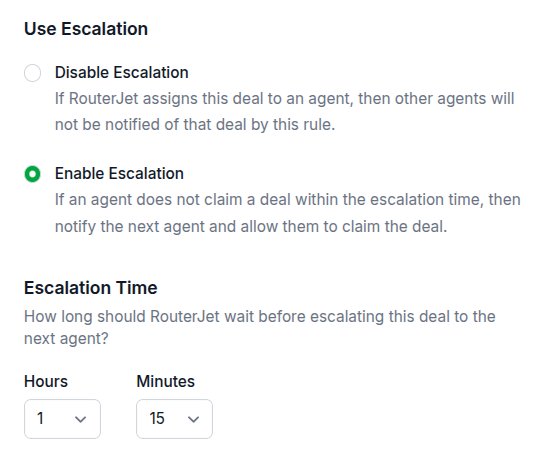
- Enable/Disable: Toggle escalation on or off for each routing rule
- Escalation Interval: Set the time between re-offers, from 1 minute up to 1,500 minutes (25 hours). Default is 30 minutes.
- Owner Routing: Choose round-robin (equal distribution) or weighted (probabilistic based on capacity you define)
- Notification Channels: Configure how owners get notified—email, SMS, Slack, WhatsApp, or Telegram
When Does Escalation Stop?
The escalation cycle automatically ends when any of these occur:
- An owner accepts the offer - Mission accomplished
- All configured owners go offline/off-shift - No one available to receive offers
- The deal’s stage changes in Pipedrive - Indicates the lead is being worked
- The rule or match is deleted - The routing no longer applies
Use Cases
High-Priority Leads: Your enterprise demo requests or pricing page submissions deserve immediate attention. Set a tight escalation interval (2-5 minutes) to ensure rapid response.
After-Hours Coverage: Rotate overnight leads through your on-call team. If your first responder doesn’t pick up within 10 minutes, the next person gets a chance.
Sales Team Capacity Balancing: During high-volume periods, escalation ensures leads don’t pile up on one rep who stepped away. The system keeps moving leads to available team members.
Response SLA Compliance: If you’ve promised prospects a response within 15 minutes, set your escalation interval to 5 minutes. Even if two people miss it, the third will get it with time to spare.
Getting Started
- Navigate to your routing rule in RouterJet
- Find the Escalation toggle and enable it
- Set your Escalation Time (how long to wait between re-offers)
- Ensure your notification channels are configured so owners actually see the offers
- Save your rule
Start with a 15-30 minute interval if you’re unsure, then tighten it based on how your team responds. Monitor your lead response times and adjust until you find the sweet spot.
What’s Next
Enable escalation on your highest-priority routing rules first. Watch how leads flow through your team over a week. Check if response times improve. Ask your reps if they’re seeing leads get claimed faster. Then expand to more rules as you see the impact.
Escalation is one of the key features that sets RouterJet apart from Pipedrive’s built-in automatic assignment—which doesn’t offer any form of lead re-offering or SLA enforcement. See our feature comparison for the full breakdown.
If you’ve got questions or feedback on escalation, shoot us an email at support@routerjet.com.

Start your free trial
No credit card required.
Assign leads automatically and free up your time.