Should You Build Pipedrive Lead Routing in Make.com?
Make.com can route Pipedrive leads for less than Zapier, but you’ll spend hours assembling what a purpose-built routing tool configures in 15 minutes, and you’ll maintain that workflow yourself going forward. It’s still a reasonable option for the right team, though, so let’s figure out if that’s you.
Someone on your team (or maybe a consultant) just suggested: “Why not build it in Make.com?” And on paper, it checks out. Make.com (formerly Integromat) costs less than Zapier, offers more flexibility, and can connect to practically anything. For a small business with 2 to 30 sales reps, it looks strong.
This article will help you figure out whether it’s strong in practice. We sell RouterJet, so we have a bias. But we’ll tell you straight when Make.com is the better choice.
Also considering Zapier? Check out our RouterJet vs Zapier comparison. Zapier recently launched a dedicated Lead Router product that may be a better fit than Make.com if you want to stay in the DIY automation lane.
The Core Tradeoff: Flexibility vs. Focus
Make.com is a workflow automation platform that can do almost anything, including lead routing. RouterJet is a lead routing tool that does one thing well.
With Make.com, you get ultimate flexibility. You design the exact workflow you want, connect any tools you need, and control every detail. The cost: you’re building and maintaining that workflow yourself.
With RouterJet, you get automatic assignment that works out of the box. Connect to Pipedrive, set your rules, and route leads within 15 minutes. The cost: you’re limited to what we’ve already built.
Neither path is wrong. But they demand very different investments of your time and technical skill.
When Make.com Is the Better Choice
We’d be doing you a disservice if we skipped this part:
You already live in Make.com. If your team runs other workflows there and knows the platform, adding lead routing to your existing setup makes sense. The learning curve is small when the tool is already familiar.
You need logic that goes beyond routing. Enrich leads with Clearbit, create Asana tasks, update a Google Sheet, AND assign to team members, all in one flow? Make.com handles multi-step workflows like this beautifully. Pipedrive automation features cover simpler versions of this, but Make gives you far more flexibility and integrations.
You route across multiple CRMs or platforms. Leads flowing between Pipedrive and HubSpot, or out to external partners? Make.com can handle cross-platform scenarios RouterJet was never designed for.
Your team genuinely enjoys building automations. Some people love the puzzle. If that’s your team, Make.com’s power is a feature, not a burden.
Your routing needs don’t fit any off-the-shelf tool. When requirements are truly unique, building custom is your only option.
Make.com Is Built for Technical Teams
This is a design choice, not a flaw, and it’s one of Make.com’s genuine strengths. But it matters for your decision.
Your first step in Make.com will be creating a webhook. Make guides you through the process, but you’ll want to understand what webhooks are before you start. Everything in your automation depends on this foundation.
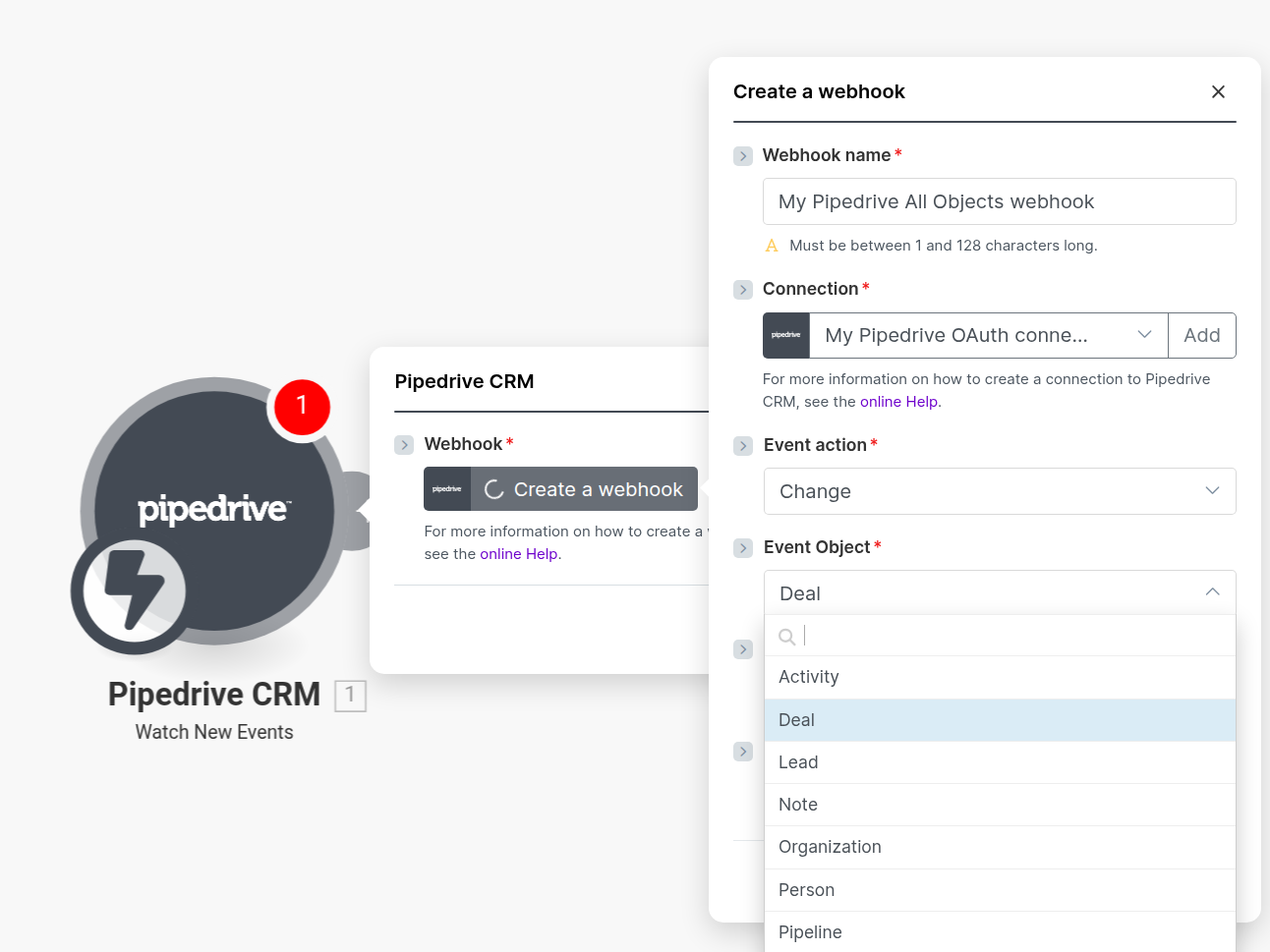
The upside: creating your own webhook gives you access to anything Pipedrive’s webhooks support. Trigger on any deal, lead, person, organization, activity, or pipeline event. Pipedrive’s webhook documentation covers what’s possible.
The downside: if terms like “webhook,” “JSON,” and “API” make you uneasy, the learning curve will be steeper than Make.com’s visual drag-and-drop interface might suggest.
Setup Time: What to Actually Expect
RouterJet setup:
- Connect to Pipedrive (OAuth, 30 seconds)
- Select which agents receive deals
- Choose your pipeline/stage triggers
- Configure notifications
- Done
The whole setup fits inside a coffee break.
Make.com setup:
A simple round-robin routing two leads takes about 30 minutes. But complexity multiplies fast.
Here’s what a basic Make.com scenario for Pipedrive deal routing looks like:
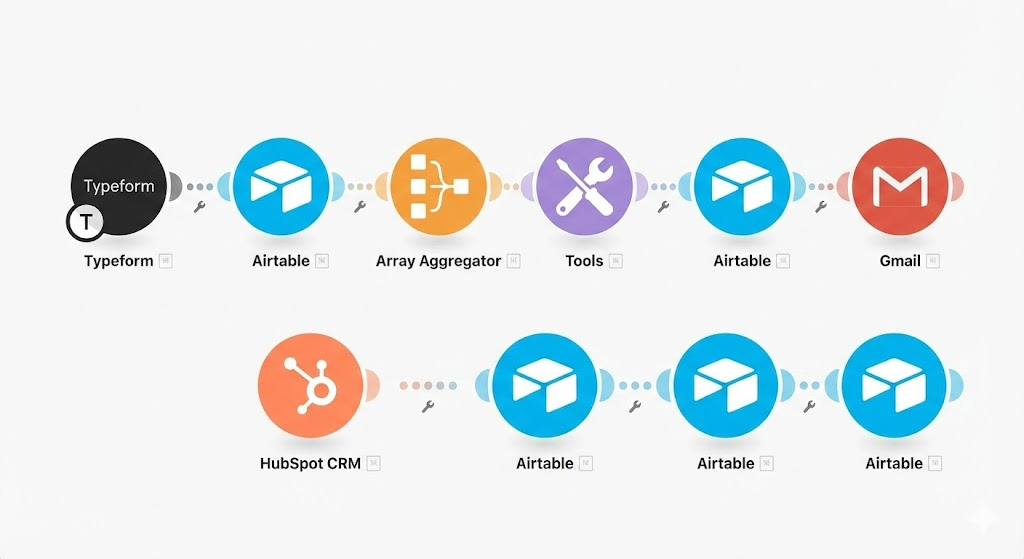
That’s five modules for basic routing. Every additional requirement adds more:
- Track who got the last lead? You’ll need an external database like Airtable. Make.com doesn’t remember anything between executions.
- Send email notifications? Another module or two.
- Send Slack notifications? More modules, plus Slack OAuth setup.
- Route based on working hours? This gets complicated fast. Likely too difficult for most teams to build reliably.
Make.com’s own lead routing tutorial uses 8+ modules and requires Airtable as an external database. And it’s not even round-robin. It’s random assignment. Over weeks or months, random distribution roughly evens out. But on any given day, one rep might get five leads while another gets one. That’s not a rounding error when your team is watching their pipeline in real time.
The Pricing Math
Make.com charges by “credits” (formerly called “operations”; they switched in August 2025). Every module that runs in your scenario consumes at least one credit, though certain AI modules may use more.
Make.com pricing tiers (monthly billing):
| Plan | Monthly Cost | Credits/Month | Minimum Polling |
|---|---|---|---|
| Free | $0 | 1,000 | 15 minutes |
| Core | ~$10 | 10,000 | 1 minute |
| Pro | ~$19 | 10,000 | 1 minute |
| Teams | ~$34 | 10,000 | 1 minute |
Annual billing is cheaper. Check Make.com’s pricing page for current rates.
RouterJet pricing:
| Plan | Monthly Cost | Includes |
|---|---|---|
| Starter | $10/agent | Email, SMS, Telegram notifications, round-robin routing |
| Business | $20/agent | All notifications (including Slack, WhatsApp), weighted routing, nested condition groups, fast escalation |
For a detailed cost breakdown across team sizes, see our Pipedrive lead routing cost calculator.
What does a typical Make.com routing scenario actually cost?
A basic scenario with 5 modules routing 30 leads per day:
- 30 leads x 5 modules x 30 days = 4,500 credits/month
That fits inside the Core plan (~$10/month). Sounds affordable.
But the math shifts quickly:
-
Webhooks burn credits too. Each incoming webhook fires your scenario and consumes credits—even if a filter blocks everything downstream. Bulk edit 500 deals in Pipedrive? That’s 500 separate webhook calls, each triggering your scenario and burning credits before a single lead gets routed.
-
More features mean more modules. Add Airtable for state management, Slack for notifications, and error handling? Your 5-module scenario doubles to 10+. Now you’re consuming 9,000+ credits for the same 30 leads/day.
-
Overages cost a premium. As of late 2025, credits beyond your plan allowance cost 25% more than included credits. Spikes add up.
-
RouterJet absorbs volume spikes. If Pipedrive sends 1,000 webhooks per second during a bulk import, there’s no extra charge. Our infrastructure handles it.
The real comparison for a 5-person team routing 30 leads/day with notifications:
- Make.com: $10-34/month (depending on complexity), plus your time to build and maintain it
- RouterJet Starter: $50/month ($10 x 5 agents), ready to go in 15 minutes
Make.com wins on sticker price. RouterJet wins on total cost of ownership, especially once you account for your time.
Notifications: Where the Gap Widens
RouterJet supports 5 notification channels out of the box, Email, SMS, Slack, WhatsApp, and Telegram, all configured in minutes.
Make.com can technically reach every one of those channels. But the effort varies dramatically:
Straightforward in Make.com:
- Email — native Gmail/SMTP modules
- SMS — native Twilio module, though you’ll need a Twilio account
More involved:
- Slack — OAuth setup, separate modules
- Telegram — bot token management, webhook configuration
A project in itself:
- WhatsApp — register as a WhatsApp Business API provider, get Meta’s approval, and sign up with a provider like Twilio or MessageBird. This isn’t a Make.com limitation, it’s how WhatsApp Business works.
If your team lives in Slack and wants instant lead alerts there, Make.com can deliver, but expect to spend significantly more setup time than RouterJet’s one-click Slack connection.
Features That Require Serious Engineering in Make.com
Some capabilities RouterJet includes out of the box would take substantial effort to replicate in Make.com:
Shift-aware routing with timezone logic. Route leads only to reps who are currently working, based on their timezone and schedule. In Make.com, you’d build complex time-based logic and maintain rep schedules in an external database.
Escalation workflows. Lead unclaimed after X minutes? Escalate to the next rep. This requires persistent state between scenario runs, something Make.com doesn’t natively support.
Accept/claim workflow. Reps receive a notification and choose to accept or pass on a lead. This kind of bidirectional interaction is complex to build in any automation platform.
Snooze and out-of-office toggles. Reps mark themselves temporarily unavailable. You’d need an external interface for status changes, plus logic to check availability during routing.
Nested condition groups. Build rules like “region is EMEA AND (deal value is above $50k OR lead source is Partner)” using multi-level ALL/ANY logic (up to 3 levels deep). In Make.com, you’d replicate this with nested router modules and filters, adding complexity to your scenario and burning more credits per execution.
Weighted round-robin. Send 50% of leads to your top closer, 25% to the next tier. Technically possible in Make.com, but requires careful engineering.
Which Fits Your Team?
RouterJet is the better fit if:
- You want to route leads in 30 minutes, not 3 hours
- Your team won’t build or maintain complex automations
- You need shift-aware routing, escalation, or accept/claim workflows
- Predictable per-agent pricing matters to you
- You’d rather configure once and move on
Make.com is the better fit if:
- You’re comfortable with webhooks and JSON
- You already use Make.com for other automations
- Lead routing is one piece of a larger multi-tool workflow
- Your requirements don’t match any dedicated tool
- You have time to build and maintain your solution
Still torn?
Here’s a practical test: try Make.com’s free plan. Build a basic round-robin for Pipedrive deals. If the process feels natural and you want to keep building, Make.com might be your answer. If you find yourself frustrated or short on time, RouterJet is probably the better path.
Try RouterJet free for 14 days. No credit card required.
Quick Reference: Feature Comparison
| Feature | RouterJet | Make.com |
|---|---|---|
| Setup time | ~30 minutes | 30 min basic, hours for full setup |
| Technical skill required | Low | Medium-High |
| Pipedrive sync | Automatic (OAuth) | Manual webhook setup |
| New deal routing | Instant | Instant (webhook) |
| New lead routing | Instant | Instant (webhook) |
| Shift-aware routing | Built-in | Build yourself |
| Escalation | Built-in | Build yourself |
| Accept/claim workflow | Built-in | Significant engineering |
| Email notifications | Built-in | Native module |
| SMS notifications | Built-in | Requires Twilio |
| Slack notifications | Built-in | Requires setup |
| WhatsApp notifications | Built-in | Major project |
| Telegram notifications | Built-in | Requires bot setup |
| Nested condition groups | Built-in | Build yourself with routers |
| Weighted round-robin | Built-in | Possible with engineering |
| State between runs | Built-in | Requires external DB |
| Pricing model | Per agent/month | Per credit |
| 5-rep team, 30 leads/day | $50-100/mo | $10-34/mo + your time |
| Cross-platform routing | Pipedrive only | Any platform |
Questions? Reach out at support@routerjet.com. We’re happy to talk through whether RouterJet is right for your team.

Start your free trial
No credit card required.
Assign leads automatically and free up your time.