Pipedrive Lead Routing: When Zapier Makes Sense and When It Doesn't
Zapier’s Lead Router handles basic round-robin distribution, but you’ll need multiple additional Zaps for notifications, CRM updates, and escalation, turning a simple routing need into an ongoing build project that costs more than a dedicated tool. And yet, “just use Zapier for that” might be the most common advice in Pipedrive Slack channels.
It makes sense on the surface. Your team probably already uses Zapier for something. Maybe you’ve even found their new Lead Router product and wondered if it solves your routing problem. This comparison will help you decide. We sell RouterJet, so we have a perspective. But we’ll be straight about when Zapier actually makes more sense.
The quick version: Zapier’s Lead Router is a component you build around. RouterJet is a complete solution you configure and run. If you’re already deep in the Zapier ecosystem with simple round-robin needs, Lead Router might be enough. If you need shift-aware routing, escalation, or multi-channel notifications without becoming a Zapier architect, RouterJet will save you significant time and money.
The Core Difference: Finished Product vs. Building Blocks
RouterJet is a complete lead routing solution. Connect it to Pipedrive, configure your rules, done.
Zapier, even with Lead Router, is a platform for building your own routing solution. Lead Router handles one piece (round-robin distribution), but you’re still assembling the rest yourself. And maintaining what you build.
Neither approach is wrong. But they require very different investments of time, money, and ongoing attention. If you’re weighing whether to build or buy, Baremetrics has a good framework for thinking through the tradeoffs.
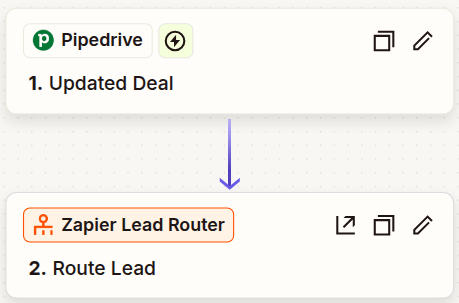
Here’s what Zapier’s routing setup looks like at first glance: a clean two-step Zap. Trigger on a deal, route it. Done, right?
What Zapier’s Lead Router Actually Does
Zapier launched Lead Router as a beta product (free through March 31, 2026). For what it does, it’s genuinely useful:
- Clean interface for creating routing queues
- Weighted round-robin distribution
- Fallback sales rep assignment
- Works with Zapier’s existing automation infrastructure
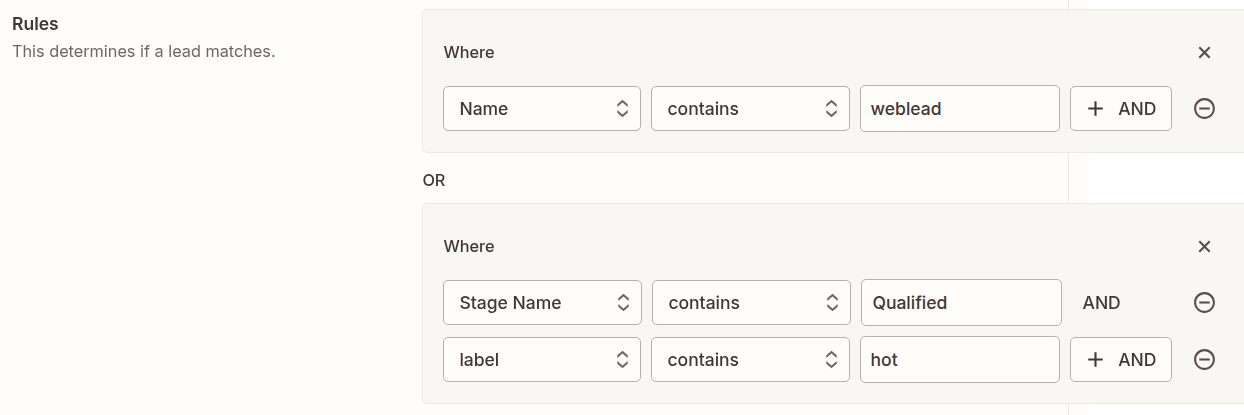
Zapier’s rule configuration is straightforward. You define conditions using field/operator/value rows, with AND/OR logic between groups:
What it doesn’t do:
- Sync sales reps from Pipedrive (you manually copy user IDs)
- Auto-update when your Pipedrive team changes
- Handle shift or timezone awareness
- Provide escalation workflows
- Send notifications (that’s separate Zaps you build)
- Route contacts or people (deals and leads only)
Lead Router handles the distribution logic. You still need Zaps to trigger on new leads, filter them, push assignments back to Pipedrive, and notify your reps.
Setup Time: What to Actually Expect
RouterJet setup:
- Connect to Pipedrive
- Select which reps receive deals
- Choose your pipeline and stage triggers
- Configure notifications
- Done
The whole setup fits inside a coffee break.
Zapier setup:
Even with Zapier experience, plan for an afternoon minimum:
- Manually copy agent information from Pipedrive, including user IDs
- Map deal fields from Pipedrive to Zapier
- Configure Lead Router queues
- Build the Zap to trigger on new deals
- Build the Zap to write assignments back to Pipedrive
- Test each piece individually
Want notifications beyond email? Add time for each channel. Slack requires another Zap. WhatsApp means registering as a WhatsApp Business API provider, getting Meta approval, and probably signing up with Twilio. That’s a project, not a configuration.
What Each Tool Can Route
| Trigger Type | RouterJet | Zapier |
|---|---|---|
| New Deals | Instant (webhook) | Instant (webhook) |
| New Leads | Instant (webhook) | Polling only (up to 15-min delay) |
| Contacts/People | Yes | No |
| Organizations | No (available on request) | Yes |
| Updated Deals | Any update, applied once | Complex (see below) |
The “Updated Deals” problem matters more than it looks.
In RouterJet, you say “route deals when they hit the Qualified stage” and it works. The rule applies once per deal, which is what most teams expect.
In Zapier, you specify exactly which fields trigger the Zap. This creates two problems:
-
Setup complexity: Think through every relevant field upfront. Miss one and your routing breaks silently. You won’t know until a lead falls through.
-
Cost unpredictability: Watch too many fields and you pay for every change to any of them. Bulk-edit a field you’re watching on 1,000 old deals? That’s 1,000 Zap triggers, even if filters prevent any downstream action.
More control is genuinely useful if you need it. Just know that it comes with more surface area to manage.
The Notification Gap
This is where the tools diverge sharply.
RouterJet notifications (all built-in):
- SMS
- Slack
- Telegram
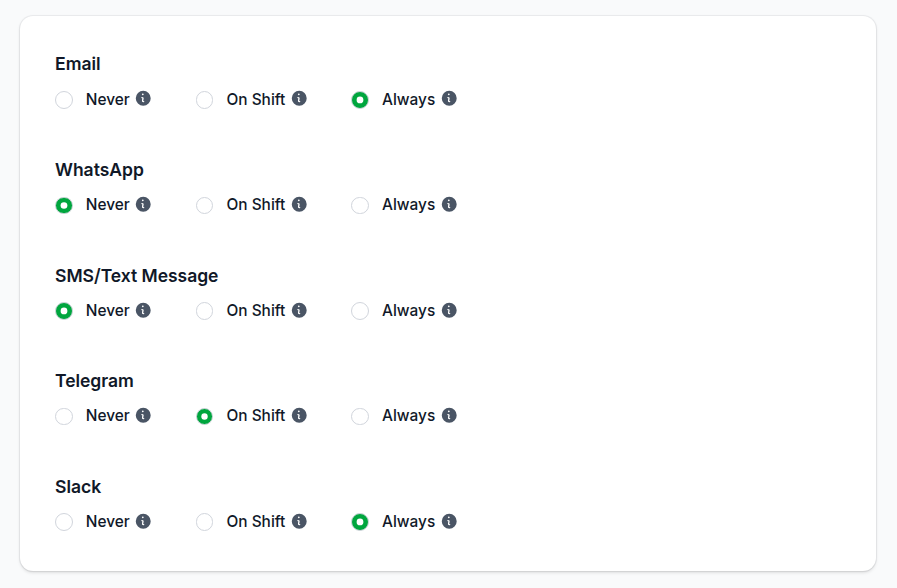
All configured in one place. Per-channel rules let you choose: always send, never send, or only when on shift.
Zapier notifications:
You build each channel yourself:
- Email: Add a Zap step. Straightforward.
- SMS: Requires Twilio or similar integration.
- Slack: Doable with their Slack integration step.
- WhatsApp: Register as a WhatsApp Business provider, get Meta approval, use a third-party service. If your core business isn’t sending messages, this is a significant undertaking.
- Telegram: Create and host a Telegram bot.
Each additional integration means another system to set up, another account to manage, another potential failure point to debug when something stops working.
Features Zapier Can’t Replicate Without Major Custom Work
Shift-aware routing: RouterJet knows when each rep is working, by timezone and day of week. Leads only go to available reps.
Building this in Zapier means maintaining a separate schedule database, checking it during routing, and handling timezone conversions yourself. Possible? Yes. A project? Also yes.
Snooze/Out-of-office: In RouterJet, a rep clicks one button to temporarily leave the rotation. In Zapier, you need a system to track availability status and check it during every routing decision.
Escalation workflows: If a lead isn’t claimed in X minutes, RouterJet automatically offers it to the next available rep. This requires state management, timers, and re-routing logic that Zapier isn’t designed for.
Accept/claim workflow: RouterJet lets reps accept or pass on leads via SMS reply, Slack button, or web UI. This bidirectional interaction sits outside Zapier’s core model.
Nested condition groups: RouterJet supports multi-level ALL/ANY condition groups, so you can express rules like “region is EMEA AND (deal value is above $50k OR lead source is Partner)” in a single rule. In Zapier, this kind of logic means splitting across multiple queues or chaining Zap paths, which gets harder to maintain as your rules grow more specific.
The Real Cost Comparison
RouterJet pricing: $10-20 per agent per month, depending on plan. A 10-person team runs $100-200/month. All features, all webhook volume, no per-lead charges.
Zapier pricing:
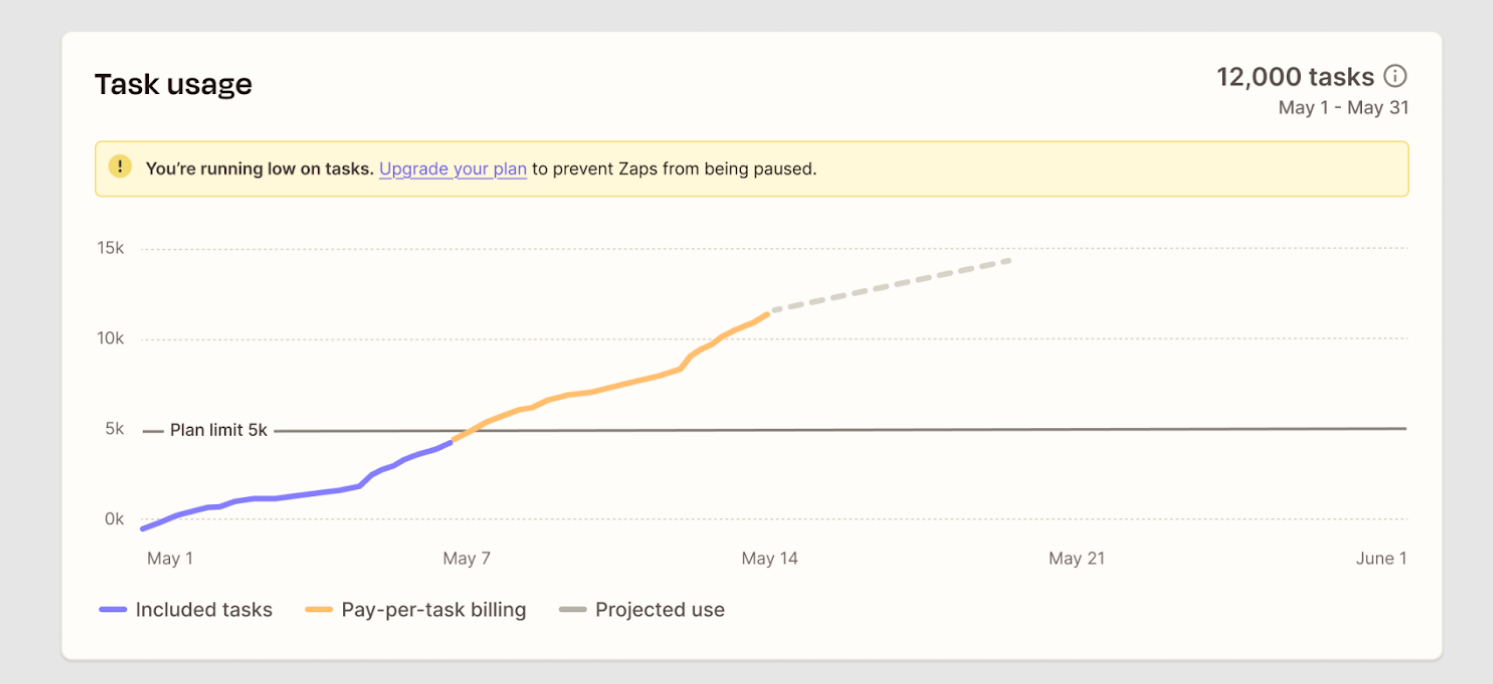
Zapier charges per “task,” and each action step in a Zap counts separately. Triggers that fire but get filtered out cost nothing. But once actions run, each one counts.
For a simple routing workflow (trigger, Lead Router, update Pipedrive):
- Lead Router: Free during beta, but 30 tasks per routed lead post-beta
- Update Pipedrive: 1 task
- Slack notification: 1 task
Post-beta: 32 tasks per lead for basic routing with Slack notification.
The math for 30 leads per day:
- 30 leads x 32 tasks x 30 days = 28,800 tasks/month
- That requires Zapier’s Team plan at roughly $250-300/month
Add SMS notifications, more routing logic, or error handling and the task count climbs.
The hidden multiplier: bulk operations.
RouterJet handles webhooks at any volume for the same flat fee. We’ve processed bursts of 1,000 leads per second for large customers. No additional charge.
In Zapier, bulk-update 1,000 deals while your Zap watches for updates? That’s 1,000 triggers. Even if filters prevent most downstream actions, you’re debugging why your task count spiked.
The maintenance cost nobody mentions:
Zapier is a platform. When Pipedrive changes something, or Zapier deprecates a step, or an integration breaks, you fix it.
RouterJet handles Pipedrive API changes, duplicate webhook issues (Pipedrive sometimes sends these), and edge cases because that’s literally all we do. We’ve been doing it since 2019.
Limitations You Should Know About
Zapier Lead Router limitations:
- Maximum 5 queues per router
- Fallback owner required for every queue
- Manual re-sync when Pipedrive users change
- New Leads use polling (up to 15-minute delay)
- 30 tasks per routed lead post-beta
RouterJet limitations:
- Pipedrive only. If you use multiple CRMs, we can’t help
- Routes deals, leads, and contacts, but not organizations as a standalone trigger
- Smaller company than Zapier (though we’ve been around since 2019)
When Zapier Is the Right Choice
We’d genuinely recommend Zapier if:
You’re already deep in the Zapier ecosystem. Your team knows Zapier well, you’re already paying for a high-tier plan, and someone on staff maintains automations. The marginal cost of adding lead routing might be lower than a new tool.
Your routing is extremely simple. Basic round-robin, no shift awareness, no escalation, email-only notifications. Lead Router handles this cleanly.
You need cross-CRM or cross-platform routing. Leads coming from multiple sources going to multiple destinations? Zapier’s flexibility shines here. RouterJet is Pipedrive-specific.
You want to route organizations. We don’t currently support this; Zapier does.
You already have staff who manage Zapier. The maintenance burden matters less when it’s already someone’s job.
When RouterJet Is the Right Choice
RouterJet makes more sense when:
You want it to just work. Connect to Pipedrive, configure rules, done. No Zap maintenance, no task counting, no debugging when something breaks.
Shift-aware routing matters. Distributed teams across timezones need leads going to whoever’s actually working right now.
Escalation is important. Hot leads can’t sit unclaimed. Automatic escalation to the next rep is built in.
You want multi-channel notifications without building them. SMS, Slack, WhatsApp: configured in minutes, not projects.
You don’t have dedicated Zapier expertise. If “figure out why the Zap broke” isn’t already someone’s job, you probably don’t want to add it.
Predictable pricing matters. Flat per-agent pricing means no surprises when lead volume spikes.
Quick Reference: Feature Comparison
| Feature | RouterJet | Zapier + Lead Router |
|---|---|---|
| Setup time | ~30 minutes | 4+ hours |
| Pipedrive sync | Automatic, instant | Manual copy/paste |
| New deal routing | Instant | Instant |
| New lead routing | Instant | Up to 15-min delay |
| Contact/person routing | Yes | No |
| Shift-aware routing | Built-in | Build yourself |
| Escalation | Built-in | Build yourself |
| Accept/claim workflow | Built-in | Not feasible |
| Nested condition groups | Built-in | Build yourself |
| Email notifications | Yes | Yes (add Zap step) |
| SMS notifications | Yes | Requires Twilio setup |
| Slack notifications | Yes | Yes (add Zap step) |
| WhatsApp notifications | Yes | Major project |
| Telegram notifications | Yes | Requires bot setup |
| Pricing model | Per agent/month | Per task |
| 10-rep team, 30 leads/day | ~$100-200/mo | ~$250-300/mo+ |
The Bottom Line
Zapier’s Lead Router is a real improvement over building round-robin logic from scratch. If you’re already in Zapier’s ecosystem with simple needs, it’s worth considering, especially while it’s free during beta.
But Lead Router is a component, not a complete solution. You’re still building and maintaining a custom routing system. The 30-task-per-lead post-beta pricing, combined with setup complexity and notification limitations, adds up.
For Pipedrive teams who want routing that works out of the box, especially with shift awareness, escalation, and multi-channel notifications, a purpose-built tool saves significant time, money, and middle-of-the-night debugging sessions.
Choose Zapier if:
- You're already paying for a high-tier Zapier plan
- Someone on your team maintains Zaps as part of their job
- Basic round-robin with email notifications is enough
- You need to route across multiple platforms, not just Pipedrive
Choose RouterJet if:
- You want routing that works without ongoing maintenance
- Your team spans timezones and needs shift-aware routing
- Unclaimed leads cost you money (escalation matters)
- Your reps respond faster to SMS, Slack, or WhatsApp than email
- Predictable pricing matters more than flexibility
Try both if you’re unsure. RouterJet has a 14-day free trial. Zapier’s Lead Router is free during beta. Set up equivalent routing in each and see which fits your team. You’ll know within an hour which approach matches how you actually work.
Questions? Reach out at support@routerjet.com. We’re happy to talk through whether RouterJet, or something else entirely, is right for your team.

Start your free trial
No credit card required.
Assign leads automatically and free up your time.